Fluentd
Oodle provides a seamless integration with Fluentd. By adding Oodle as a output destination in your Fluentd configuration, you can start sending logs directly to your Oodle instance.
Configuration
To configure Fluentd to send logs to Oodle, you'll need the following values:
OODLE_INSTANCE: Your Oodle instance ID. Go toSettingsicon ->API Keyspage in your Oodle UI to find out. (Oodle UI links: ap1, us1)OODLE_API_KEY: Your Oodle API key for authentication. Go toSettingsicon ->API Keysin your Oodle UI to choose an appropriate key. (Oodle UI links: ap1, us1)
Add the following configuration to your Fluentd configuration file:
<match **>
  @type http
  endpoint "https://<OODLE_INSTANCE>-logs.collector.oodle.ai/ingest/v1/logs"
  headers {"X-OODLE-INSTANCE":"<OODLE_INSTANCE>","X-API-KEY":"<OODLE_API_KEY>"}
  content_type application/json
  json_array false
  <format>
    @type json
    include_time_key true
    time_key timestamp
    time_format %Y-%m-%dT%H:%M:%S.%NZ
  </format>
</match>
Setup
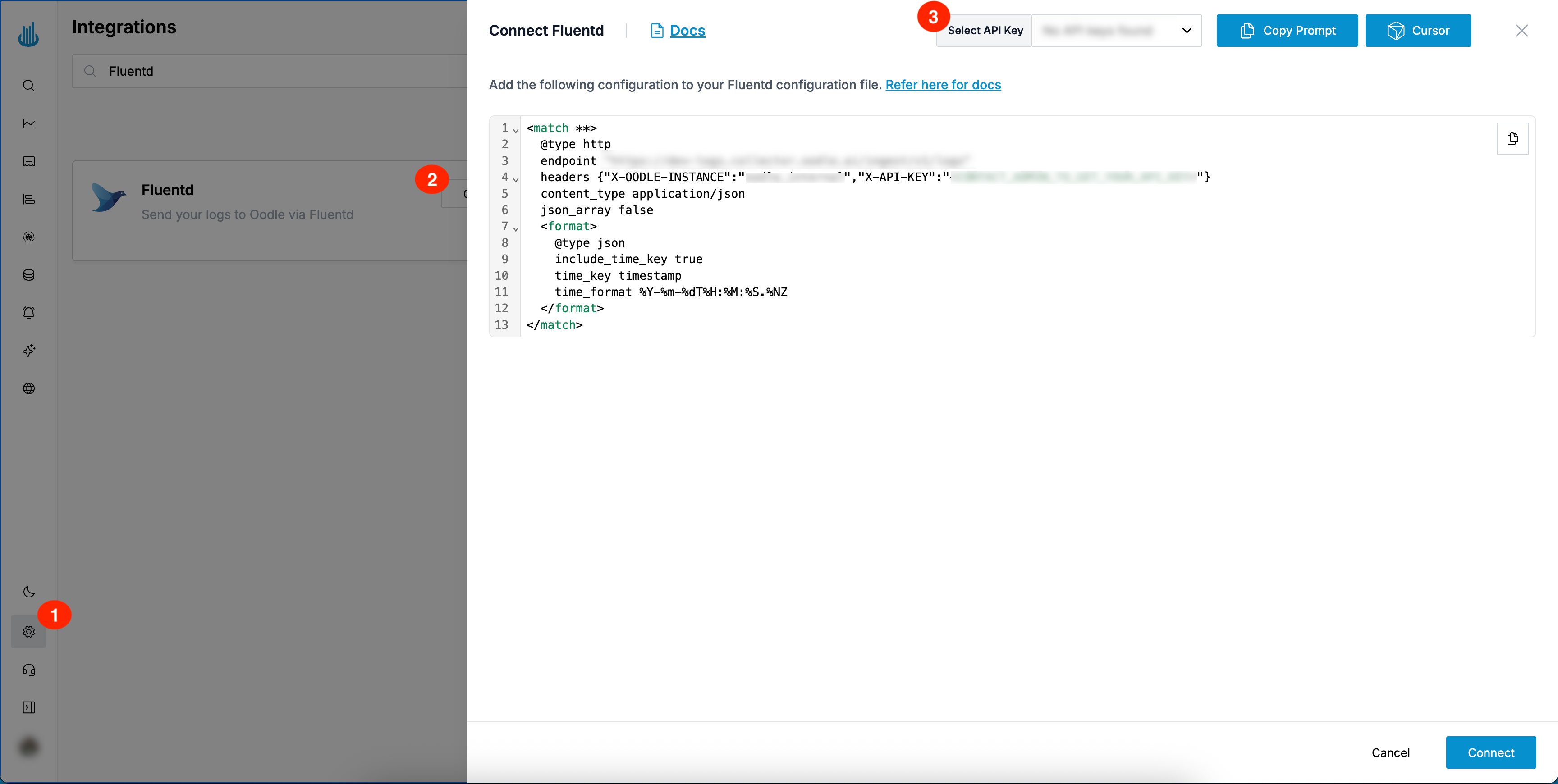
You can find the required Fluent Bit configuration changes by doing the following:
- Login to the Oodle UI, then navigate to the Integrations page
- Click on the Fluentd tile
- Choose an appropriate API key from the list on top of the drawer
Add the configuration specified in the drawer to your Fluentd configuration file
Collect Fluentd internal metrics (optional)
Monitor Fluentd itself (buffer queue depth, retries, output errors) by exposing
its internal metrics. Install the fluent-plugin-prometheus gem
(gem install fluent-plugin-prometheus), then add these sources to expose a
Prometheus /metrics endpoint. See the
Fluentd Prometheus metrics docs.
<source>
  @type prometheus
  bind 0.0.0.0
  port 24231
  metrics_path /metrics
</source>
<source>
  @type prometheus_monitor
  interval 30
</source>
<source>
  @type prometheus_output_monitor
  interval 30
</source>
Fluentd exposes these metrics for a Prometheus-compatible scraper to collect.
Point a scraper (Grafana Alloy, vmagent, or Prometheus in agent mode) at
http://<fluentd-host>:24231/metrics and remote-write to
https://<OODLE_INSTANCE>.collector.oodle.ai/v1/prometheus/<OODLE_INSTANCE>/write
with the X-API-KEY header.
Support
If you need assistance or have any questions, please reach out to us through:
- Email at [email protected]