Datadog
Oodle ingests metrics, logs, and traces (APM) from the Datadog agent. This guide covers all supported signals and configuration methods.
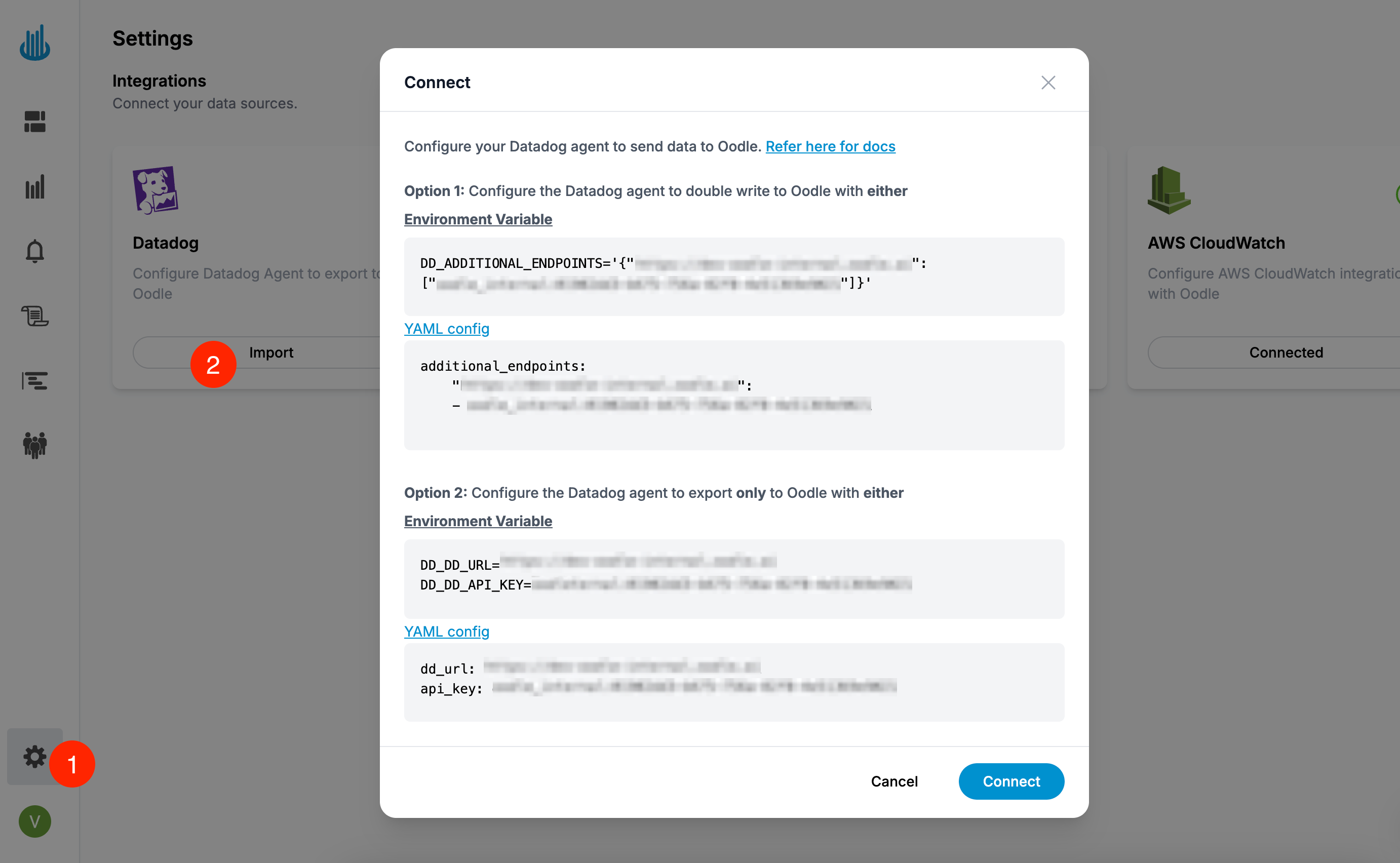
The quickest way to get started is through the Datadog integration tile on the Integrations page — it generates the exact configuration for your instance.
Supported signals
| Signal | Dual-ship env var | Single-ship env var |
|---|---|---|
| Metrics | DD_ADDITIONAL_ENDPOINTS | DD_DD_URL + DD_API_KEY |
| Logs | DD_LOGS_CONFIG_ADDITIONAL_ENDPOINTS | DD_LOGS_CONFIG_DD_URL |
| Traces | DD_APM_ADDITIONAL_ENDPOINTS | DD_APM_DD_URL |
The endpoint URL and API key for your instance are shown in the Datadog tile on the Settings → Integrations page.
Wherever metrics are shipped to Oodle, set
DD_USE_V3_API_SERIES_ENABLED=false (agent config key
use_v3_api.series.enabled: false) so the Agent submits
series on the v2 metrics intake that Oodle accepts. This
setting is included in every metrics configuration below.
Dual-shipping (Datadog + Oodle)
Send data to both Datadog and Oodle simultaneously.
Datadog Helm chart
Add the following to your Helm values.yaml for the
Datadog Helm chart:
datadog:
  env:
    # Metrics
    - name: DD_ADDITIONAL_ENDPOINTS
      value: '{"<oodle_metrics_endpoint>": ["<oodle_api_key>"]}'
    - name: DD_USE_V3_API_SERIES_ENABLED
      value: 'false'
    # Logs
    - name: DD_LOGS_CONFIG_ADDITIONAL_ENDPOINTS
      value: '[{"api_key": "<oodle_api_key>", "Host": "<oodle_logs_host>", "Port": 443, "is_reliable": false}]'
    - name: DD_LOGS_CONFIG_FORCE_USE_HTTP
      value: 'true'
    # APM / Traces
    - name: DD_APM_ADDITIONAL_ENDPOINTS
      value: '{"<oodle_traces_endpoint>": ["<oodle_api_key>"]}'

clusterAgent:
  env:
    # Metrics (cluster agent also needs this)
    - name: DD_ADDITIONAL_ENDPOINTS
      value: '{"<oodle_metrics_endpoint>": ["<oodle_api_key>"]}'
    - name: DD_USE_V3_API_SERIES_ENABLED
      value: 'false'
Then install or upgrade:
helm repo add --force-update datadog \
  https://helm.datadoghq.com && \
helm upgrade --install datadog-agent datadog/datadog \
  --values values.yaml
Datadog Operator
Apply the following DatadogAgent resource:
apiVersion: datadoghq.com/v2alpha1
kind: DatadogAgent
metadata:
  name: datadog

spec:
  override:
    nodeAgent:
      containers:
        agent:
          env:
            # Metrics
            - name: DD_ADDITIONAL_ENDPOINTS
              value: '{"<oodle_metrics_endpoint>": ["<oodle_api_key>"]}'
            - name: DD_USE_V3_API_SERIES_ENABLED
              value: 'false'
            # Logs
            - name: DD_LOGS_CONFIG_ADDITIONAL_ENDPOINTS
              value: '[{"api_key": "<oodle_api_key>", "Host": "<oodle_logs_host>", "Port": 443, "is_reliable": false}]'
            - name: DD_LOGS_CONFIG_FORCE_USE_HTTP
              value: 'true'
        trace-agent:
          env:
            # APM / Traces
            - name: DD_APM_ADDITIONAL_ENDPOINTS
              value: '{"<oodle_traces_endpoint>": ["<oodle_api_key>"]}'
    clusterAgent:
      env:
        # Metrics (cluster agent also needs this)
        - name: DD_ADDITIONAL_ENDPOINTS
          value: '{"<oodle_metrics_endpoint>": ["<oodle_api_key>"]}'
        - name: DD_USE_V3_API_SERIES_ENABLED
          value: 'false'
kubectl apply -f datadog-agent.yaml
Datadog Agent YAML
Add the following to your datadog.yaml:
# Metrics
additional_endpoints:
  "<oodle_metrics_endpoint>":
    - <oodle_api_key>
use_v3_api:
  series:
    enabled: false

# APM / Traces
apm_config:
  additional_endpoints:
    "<oodle_traces_endpoint>":
      - <oodle_api_key>

# Logs
logs_config:
  force_use_http: true
  additional_endpoints:
    - api_key: <oodle_api_key>
      Host: <oodle_logs_host>
      Port: 443
      is_reliable: false
Environment variables
If you are not using Helm, Operator, or YAML config,
set these environment variables on both the agent and
cluster-agent containers:
# Metrics
DD_ADDITIONAL_ENDPOINTS=\
'{"<oodle_metrics_endpoint>": ["<oodle_api_key>"]}'
DD_USE_V3_API_SERIES_ENABLED=false

# Logs
DD_LOGS_CONFIG_ADDITIONAL_ENDPOINTS=\
'[{"api_key": "<oodle_api_key>", "Host": "<oodle_logs_host>", "Port": 443, "is_reliable": false}]'
DD_LOGS_CONFIG_FORCE_USE_HTTP='true'

# APM / Traces
DD_APM_ADDITIONAL_ENDPOINTS=\
'{"<oodle_traces_endpoint>": ["<oodle_api_key>"]}'
Single-shipping (Oodle only)
Stop sending data to Datadog and send only to Oodle.
Datadog Helm chart
datadog:
  apiKey: <oodle_api_key>
  dd_url: <oodle_metrics_endpoint>
  logs:
    enabled: true
  apm:
    enabled: true
  env:
    # Metrics
    - name: DD_USE_V3_API_SERIES_ENABLED
      value: 'false'
    # Logs
    - name: DD_LOGS_CONFIG_DD_URL
      value: '<oodle_logs_base_url>'
    - name: DD_LOGS_CONFIG_FORCE_USE_HTTP
      value: 'true'
    # APM / Traces
    - name: DD_APM_DD_URL
      value: '<oodle_traces_endpoint>'
Then install or upgrade:
helm repo add --force-update datadog \
  https://helm.datadoghq.com && \
helm upgrade --install datadog-agent datadog/datadog \
  --values values.yaml
Datadog Operator
apiVersion: datadoghq.com/v2alpha1
kind: DatadogAgent
metadata:
  name: datadog

spec:
  global:
    endpoint:
      url: <oodle_metrics_endpoint>
    credentials:
      apiKey: <oodle_api_key>

  override:
    nodeAgent:
      containers:
        agent:
          env:
            # Metrics
            - name: DD_USE_V3_API_SERIES_ENABLED
              value: 'false'
            # Logs
            - name: DD_LOGS_CONFIG_DD_URL
              value: '<oodle_logs_base_url>'
            - name: DD_LOGS_CONFIG_FORCE_USE_HTTP
              value: 'true'
        trace-agent:
          env:
            # APM / Traces
            - name: DD_APM_DD_URL
              value: '<oodle_traces_endpoint>'
kubectl apply -f datadog-agent.yaml
Datadog Agent YAML
# Metrics
dd_url: <oodle_metrics_endpoint>
api_key: <oodle_api_key>
use_v3_api:
  series:
    enabled: false

# APM / Traces
apm_config:
  apm_dd_url: <oodle_traces_endpoint>

# Logs
logs_config:
  logs_dd_url: <oodle_logs_base_url>
  force_use_http: true
Environment variables
# Metrics
DD_DD_URL=<oodle_metrics_endpoint>
DD_API_KEY=<oodle_api_key>
DD_USE_V3_API_SERIES_ENABLED=false

# Logs
DD_LOGS_CONFIG_DD_URL='<oodle_logs_base_url>'
DD_LOGS_CONFIG_FORCE_USE_HTTP='true'

# APM / Traces
DD_APM_DD_URL='<oodle_traces_endpoint>'
Amazon ECS
Run the Datadog Agent in Amazon ECS and send its metrics and traces to Oodle with the same environment variables as on other platforms. You set them on the Agent container: the sidecar in each task on Fargate, or the Agent daemon task on EC2.
The Datadog integration tile has an Amazon ECS Fargate tab. It generates the configuration below with the endpoints and the API key of your instance. For logs from ECS, and for routers such as FireLens, see the Amazon ECS guide.
Fargate with APM: dual-shipping
This setup keeps your Datadog configuration and adds Oodle as a second destination. The application code does not change.
-
Store the values that hold the Oodle API key as SSM SecureString parameters. If you put them in the
environmentof the task definition, anyone who can read the task definition can read the key.aws ssm put-parameter --overwrite --type SecureString \
--name /datadog/oodle-additional-endpoints \
--value '{"<oodle_metrics_endpoint>":["<oodle_api_key>"]}'
aws ssm put-parameter --overwrite --type SecureString \
--name /datadog/oodle-apm-additional-endpoints \
--value '{"<oodle_traces_endpoint>":["<oodle_api_key>"]}' -
Give the task execution role
ssm:GetParametersonarn:aws:ssm:<region>:<account-id>:parameter/datadog/*. If the parameters use a customer-managed KMS key, also give itkms:Decrypt. -
Add one Agent container to each task definition. The
/datadog/api-keyparameter holds your Datadog API key. SetDD_SITEto the site of your Datadog account.{
"name": "datadog-agent",
"image": "public.ecr.aws/datadog/agent:latest",
"essential": true,
"environment": [
{ "name": "ECS_FARGATE", "value": "true" },
{ "name": "DD_SITE", "value": "datadoghq.com" },
{ "name": "DD_USE_V3_API_SERIES_ENABLED", "value": "false" },
{ "name": "DD_APM_ENABLED", "value": "true" }
],
"secrets": [
{ "name": "DD_API_KEY", "valueFrom": "arn:aws:ssm:<region>:<account-id>:parameter/datadog/api-key" },
{ "name": "DD_ADDITIONAL_ENDPOINTS", "valueFrom": "arn:aws:ssm:<region>:<account-id>:parameter/datadog/oodle-additional-endpoints" },
{ "name": "DD_APM_ADDITIONAL_ENDPOINTS", "valueFrom": "arn:aws:ssm:<region>:<account-id>:parameter/datadog/oodle-apm-additional-endpoints" }
],
"portMappings": [
{ "containerPort": 8126, "protocol": "tcp" },
{ "containerPort": 8125, "protocol": "udp" }
],
"healthCheck": {
"command": ["CMD-SHELL", "agent health"],
"interval": 10,
"timeout": 5,
"retries": 3,
"startPeriod": 15
}
} -
Add the service identity to each app container. This is Datadog Unified Service Tagging. The environment variables tag the spans, and the Docker labels tag the container metrics.
{
  "environment": [
    { "name": "DD_SERVICE", "value": "checkout" },
    { "name": "DD_ENV", "value": "production" },
    { "name": "DD_VERSION", "value": "1.4.2" }
  ],
  "dockerLabels": {
    "com.datadoghq.tags.service": "checkout",
    "com.datadoghq.tags.env": "production",
    "com.datadoghq.tags.version": "1.4.2"
  },
  "dependsOn": [{ "containerName": "datadog-agent", "condition": "HEALTHY" }]
}
Do not set
DD_AGENT_HOST. The containers in anawsvpctask share one network namespace, so the tracer reaches the Agent on its default address,localhost:8126. ThedependsOnentry starts the app after the Agent accepts traces. -
Deploy the new task definitions. Then make sure that the stats and the spans arrive. Use your own
envand service name:oodle metrics query --query 'sum by (service) (rate(dd_trace_stats_hits{env="production"}[5m]))'
oodle traces list --service checkout --start -5m --end nowThe first command shows one series per service. The second command must return traces. The spans also show in the Traces Explorer, and the stats fill the Service Catalog.
On Fargate the Agent does not collect the logs of the other containers in the task. To send logs, use FireLens, as the Amazon ECS guide shows.
Fargate: single-shipping (Oodle only)
Store the Oodle API key in /datadog/api-key, and give the Agent
the Oodle URLs instead of additional endpoints. You do not need
DD_SITE or the two additional-endpoint secrets.
"environment": [
  { "name": "ECS_FARGATE", "value": "true" },
  { "name": "DD_DD_URL", "value": "<oodle_metrics_endpoint>" },
  { "name": "DD_USE_V3_API_SERIES_ENABLED", "value": "false" },
  { "name": "DD_APM_ENABLED", "value": "true" },
  { "name": "DD_APM_DD_URL", "value": "<oodle_traces_endpoint>" }
],
"secrets": [
  { "name": "DD_API_KEY", "valueFrom": "arn:aws:ssm:<region>:<account-id>:parameter/datadog/api-key" }
]
The app containers need the same fields as in step 4 above.
EC2 and the Datadog Terraform module
On the EC2 launch type, the Agent runs as a daemon task. The
official
terraform-aws-ecs-datadog
module (ecs_fargate / ecs_ec2) has a dd_environment input
for the same variables. A runnable example for both launch types
is in the
oodle-onboarding datadog/ecs
demo.
For single-shipping on the EC2 launch type, also set
DD_ORCHESTRATOR_EXPLORER_ENABLED=false. Orchestrator Explorer
ships to the site-based process intake of Datadog, which
DD_DD_URL cannot redirect to Oodle.
Support
If you need assistance or have any questions, please reach out to us through:
- Email at [email protected]