AWS Lambda
Oodle's Serverless monitoring gives you visibility into your AWS Lambda functions, including invocation counts, latency, error rates, and cold starts, in one view.
Send Lambda data to Oodle
You can send Lambda data to Oodle in two ways. Use one or both.
| Method | Signals | How it works |
|---|---|---|
| Pull from AWS | Metrics, logs | Oodle reads the AWS/Lambda CloudWatch namespace, and a CloudWatch Logs subscription or an S3 bucket sends the logs. You do not change the function. |
| Push via Extension Layer | Metrics, logs, traces | The OpenTelemetry collector runs as a Lambda extension beside your code and sends data straight to Oodle, within seconds of each invocation. |
In Oodle, open Integrations and select the AWS Lambda tile. The tile has one tab for each method.
Pull from AWS
- Connect the AWS account on the CloudWatch metrics
integration, and enable the
AWS/Lambdanamespace. - Send the logs through CloudWatch Logs
(log groups
/aws/lambda/<function-name>) or S3.
The Serverless page uses the CloudWatch metrics from this method.
Push via Extension Layer
The OpenTelemetry collector Lambda layer
runs the collector as a Lambda extension. The OpenTelemetry SDK in your
function sends traces, metrics, and logs to the collector on
localhost, and the collector sends them to Oodle.
The collector also reads the Lambda Telemetry API. It adds, without
code, the same log lines that Lambda writes to CloudWatch, the faas_*
platform metrics, and a span for each cold start. The tab turns it on
by default.
You choose how the SDK gets into the function:
| Instrumentation | How it works | Use it when |
|---|---|---|
| None | Only the collector layer. Oodle gets the Telemetry API data: every log line, the faas_* metrics, and the cold start spans. | You need logs and platform metrics, and no traces or metrics from your own code |
| Language layer | A second layer loads the SDK and instruments the handler. You do not change your code. | Python, Node.js, or Java, and you want no code change |
| In code | You set up the SDK in your function, with only the instrumentations it needs. Only the collector layer is added. | Cold start time matters, or the runtime is Go, Rust, .NET, or Ruby |
The in-code setup loads only what you name, so its cold starts are shorter than with the language layer.
The Push via Extension Layer tab fills in your endpoint, instance, and API key, and makes the commands for your function. The steps below show the same setup.
1. Add collector.yaml to the deployment package
Put this file at the root of the deployment package, next to your
handler. Lambda extracts the package to /var/task, where the collector
reads it. Replace <instance-id> with your Oodle instance ID.
receivers:
  otlp:
    protocols:
      grpc:
        endpoint: localhost:4317
      http:
        endpoint: localhost:4318

processors:
  decouple:

exporters:
  otlp_http/oodle:
    endpoint: https://<instance-id>-otlp.collector.oodle.ai
    headers:
      X-OODLE-INSTANCE: <instance-id>
      X-API-KEY: ${env:OODLE_API_KEY}

service:
  pipelines:
    metrics:
      receivers: [otlp]
      processors: [decouple]
      exporters: [otlp_http/oodle]
    logs:
      receivers: [otlp]
      processors: [decouple]
      exporters: [otlp_http/oodle]
    traces:
      receivers: [otlp]
      processors: [decouple]
      exporters: [otlp_http/oodle]
To send fewer signals, remove their pipelines.
The file does not contain the API key. The collector reads the key from
the OODLE_API_KEY environment variable, so you can keep the file in
source control.
The decouple processor lets the function return before the collector
sends the data to Oodle. Without it, the collector's pipeline is
synchronous, and the function's response waits for the export. Keep
decouple as the last processor in each pipeline. The collector still
sends all data before Lambda freezes the environment, so Lambda bills
the export time.
For a function with frequent invocations, you can add the batch
processor before decouple. The collector then sends fewer, larger
requests, but data can arrive in Oodle up to five minutes later.
The Lambda Telemetry API
To also collect from the Telemetry API, add the telemetryapi receiver.
It receives the same log lines that Lambda writes to CloudWatch:
everything the function writes to stdout and stderr, and Lambda's
START, END, and REPORT lines. Logs then come from the Telemetry API
only, so the SDK sends no logs and no line arrives twice.
receivers:
  otlp:
    protocols:
      grpc:
        endpoint: localhost:4317
      http:
        endpoint: localhost:4318
  telemetryapi:
    export_interval_ms: 0
    log_report: true
    types: [platform, function]

processors:
  decouple:

exporters:
  otlp_http/oodle:
    endpoint: https://<instance-id>-otlp.collector.oodle.ai
    headers:
      X-OODLE-INSTANCE: <instance-id>
      X-API-KEY: ${env:OODLE_API_KEY}

service:
  pipelines:
    metrics:
      receivers: [otlp, telemetryapi]
      processors: [decouple]
      exporters: [otlp_http/oodle]
    logs:
      receivers: [telemetryapi]
      processors: [decouple]
      exporters: [otlp_http/oodle]
    traces:
      receivers: [otlp, telemetryapi]
      processors: [decouple]
      exporters: [otlp_http/oodle]
For logs only through the Telemetry API, keep only the logs pipeline and
remove the otlp receiver. The function then needs no SDK.
Keep export_interval_ms: 0. Lambda freezes the execution environment
between invocations, so the receiver's default 60 second export timer
seldom runs. Without this setting, no faas_* metric reaches Oodle,
with or without decouple.
Keep log_report: true too. Without it, the receiver drops Lambda's
REPORT line, which gives the duration, billed duration, and memory of
each invocation. Lambda sends the END and REPORT lines after the
invocation ends, so they reach Oodle when the environment next runs, at
the next invocation or at shutdown.
types: [platform, function] leaves out the extension's own log lines.
They have no message field, so they would arrive in Oodle with an
empty body. CloudWatch still keeps them.
2. Instrument the function
With the Telemetry API on, this step is optional. To send only the
Telemetry API data, add only the collector layer, and remove the otlp
receiver and otlp from each pipeline in collector.yaml.
Option A: language layer
Add the layer for your runtime and set AWS_LAMBDA_EXEC_WRAPPER. The
wrapper starts the SDK before the handler and flushes the data before
the invocation ends.
| Runtime | Layer | AWS_LAMBDA_EXEC_WRAPPER |
|---|---|---|
| Python | arn:aws:lambda:<region>:184161586896:layer:opentelemetry-python-0_21_0:1 | /opt/otel-instrument |
| Node.js | arn:aws:lambda:<region>:184161586896:layer:opentelemetry-nodejs-0_23_0:1 | /opt/otel-handler |
| Java | arn:aws:lambda:<region>:184161586896:layer:opentelemetry-javaagent-0_21_0:1 | /opt/otel-handler |
Without the Telemetry API, logs come from the SDK. Set
OTEL_LOGS_EXPORTER=otlp. For Python, also set
OTEL_PYTHON_LOGGING_AUTO_INSTRUMENTATION_ENABLED=true.
Load only the instrumentations that the function needs. Each one that the layer loads adds to every cold start.
| Runtime | Environment variables |
|---|---|
| Python | The layer loads every instrumentation that it contains. List the ones that the function does not use in OTEL_PYTHON_DISABLED_INSTRUMENTATIONS, for example django,flask,requests,sqlalchemy. |
| Node.js | Name only the ones that the function uses in OTEL_NODE_ENABLED_INSTRUMENTATIONS, for example aws-sdk,http. |
| Java | Set OTEL_INSTRUMENTATION_COMMON_DEFAULT_ENABLED=false, then OTEL_INSTRUMENTATION_<NAME>_ENABLED=true for each one that the function uses, for example OTEL_INSTRUMENTATION_AWS_SDK_ENABLED=true. |
Option B: in code
Use only the collector layer, and set up the SDK in the function. Add an instrumentation only for a library that the function calls: each one adds to every cold start. Remove the parts for a signal that you do not send. With the Telemetry API on, remove the log setup: stdout already has the log lines.
The SDK also exports while an invocation runs: spans every few seconds,
and metrics every 60 seconds. For a long invocation, this puts data in
Oodle before the invocation ends. To change the metrics interval, set
OTEL_METRIC_EXPORT_INTERVAL in milliseconds. Each handler flushes
before it returns, because Lambda freezes the environment when the
handler returns, and the SDK loses the data that it did not send.
- Python
- Node.js
- Java
- Go
requirements.txt: Add the SDK. Add an instrumentation package only for a library that your function calls: each one adds to every cold start.
opentelemetry-sdk
opentelemetry-exporter-otlp-proto-http
# Only the instrumentations for libraries your function calls:
opentelemetry-instrumentation-botocore
otel_setup.py: Create this file next to your handler.
import logging

from opentelemetry.sdk.resources import Resource
from opentelemetry import trace
from opentelemetry.exporter.otlp.proto.http.trace_exporter import OTLPSpanExporter
from opentelemetry.sdk.trace import TracerProvider
from opentelemetry.sdk.trace.export import BatchSpanProcessor
from opentelemetry import metrics
from opentelemetry.exporter.otlp.proto.http.metric_exporter import OTLPMetricExporter
from opentelemetry.sdk.metrics import MeterProvider
from opentelemetry.sdk.metrics.export import PeriodicExportingMetricReader
from opentelemetry._logs import set_logger_provider
from opentelemetry.exporter.otlp.proto.http._log_exporter import OTLPLogExporter
from opentelemetry.sdk._logs import LoggerProvider, LoggingHandler
from opentelemetry.sdk._logs.export import BatchLogRecordProcessor
from opentelemetry.instrumentation.botocore import BotocoreInstrumentor

# Reads OTEL_SERVICE_NAME. The exporters read OTEL_EXPORTER_OTLP_ENDPOINT
# and send to the collector extension on localhost.
resource = Resource.create()
providers = []

tracer_provider = TracerProvider(resource=resource)
tracer_provider.add_span_processor(BatchSpanProcessor(OTLPSpanExporter()))
trace.set_tracer_provider(tracer_provider)
providers.append(tracer_provider)

# Exports every OTEL_METRIC_EXPORT_INTERVAL ms (60000 by default), so a
# long invocation sends metrics while it runs. flush() sends the rest.
meter_provider = MeterProvider(
    resource=resource,
    metric_readers=[PeriodicExportingMetricReader(OTLPMetricExporter())],
)
metrics.set_meter_provider(meter_provider)
providers.append(meter_provider)

logger_provider = LoggerProvider(resource=resource)
logger_provider.add_log_record_processor(BatchLogRecordProcessor(OTLPLogExporter()))
set_logger_provider(logger_provider)
logging.getLogger().addHandler(LoggingHandler(logger_provider=logger_provider))
providers.append(logger_provider)

# Instrument only the libraries your function calls, before it creates
# their clients.
BotocoreInstrumentor().instrument()


def flush():
    """Sends everything to the collector. Call it before the handler returns."""
    for provider in providers:
        provider.force_flush()
app.py: Import it first in your handler module, and flush before the handler returns.
import otel_setup  # First, so it instruments boto3.

from opentelemetry import trace

tracer = trace.get_tracer(__name__)


def handler(event, context):
    try:
        with tracer.start_as_current_span(
            context.function_name, kind=trace.SpanKind.SERVER
        ):
            ...  # Your code.
    finally:
        # Lambda freezes the environment when the handler returns.
        otel_setup.flush()
Install the packages. Add an instrumentation package only for a library that your function calls: each one adds to every cold start.
npm install \
  @opentelemetry/api \
  @opentelemetry/resources \
  @opentelemetry/sdk-trace-node \
  @opentelemetry/sdk-trace-base \
  @opentelemetry/exporter-trace-otlp-proto \
  @opentelemetry/sdk-metrics \
  @opentelemetry/exporter-metrics-otlp-proto \
  @opentelemetry/api-logs \
  @opentelemetry/sdk-logs \
  @opentelemetry/exporter-logs-otlp-proto \
  @opentelemetry/instrumentation \
  @opentelemetry/instrumentation-aws-sdk
otel-setup.js: Create this file next to your handler.
const { metrics } = require('@opentelemetry/api');
const { logs } = require('@opentelemetry/api-logs');
const { resourceFromAttributes } = require('@opentelemetry/resources');
const { NodeTracerProvider } = require('@opentelemetry/sdk-trace-node');
const { BatchSpanProcessor } = require('@opentelemetry/sdk-trace-base');
const { OTLPTraceExporter } = require('@opentelemetry/exporter-trace-otlp-proto');
const {
  MeterProvider,
  PeriodicExportingMetricReader,
} = require('@opentelemetry/sdk-metrics');
const { OTLPMetricExporter } = require('@opentelemetry/exporter-metrics-otlp-proto');
const { LoggerProvider, BatchLogRecordProcessor } = require('@opentelemetry/sdk-logs');
const { OTLPLogExporter } = require('@opentelemetry/exporter-logs-otlp-proto');
const { registerInstrumentations } = require('@opentelemetry/instrumentation');
const { AwsInstrumentation } = require('@opentelemetry/instrumentation-aws-sdk');

// The exporters read OTEL_EXPORTER_OTLP_ENDPOINT and send to the
// collector extension on localhost.
const resource = resourceFromAttributes({
  'service.name': process.env.OTEL_SERVICE_NAME,
});
const providers = [];

const tracerProvider = new NodeTracerProvider({
  resource,
  spanProcessors: [new BatchSpanProcessor(new OTLPTraceExporter())],
});
tracerProvider.register();
providers.push(tracerProvider);

// Exports on a timer, so a long invocation sends metrics while it
// runs. flush() sends the rest.
const meterProvider = new MeterProvider({
  resource,
  readers: [
    new PeriodicExportingMetricReader({
      exporter: new OTLPMetricExporter(),
      exportIntervalMillis: Number(process.env.OTEL_METRIC_EXPORT_INTERVAL ?? 60000),
    }),
  ],
});
metrics.setGlobalMeterProvider(meterProvider);
providers.push(meterProvider);

const loggerProvider = new LoggerProvider({
  resource,
  processors: [new BatchLogRecordProcessor({ exporter: new OTLPLogExporter() })],
});
logs.setGlobalLoggerProvider(loggerProvider);
providers.push(loggerProvider);

// Instrument only the libraries your function calls, before it loads
// them.
registerInstrumentations({ instrumentations: [new AwsInstrumentation()] });

// Sends everything to the collector. Await it before the handler returns.
async function flush() {
  await Promise.all(providers.map((provider) => provider.forceFlush()));
}

module.exports = { flush };
index.js: Require it first in your handler module, and flush before the handler returns.
const otelSetup = require('./otel-setup'); // First, so it instruments the AWS SDK.
const { trace, SpanKind } = require('@opentelemetry/api');
const { logs } = require('@opentelemetry/api-logs');

const tracer = trace.getTracer('handler');
const logger = logs.getLogger('handler');

exports.handler = async (event, context) => {
  try {
    return await tracer.startActiveSpan(
      context.functionName,
      { kind: SpanKind.SERVER },
      async (span) => {
        try {
          logger.emit({ severityText: 'INFO', body: 'Invocation started' });
          // Your code.
        } finally {
          span.end();
        }
      }
    );
  } finally {
    // Lambda freezes the environment when the handler returns.
    await otelSetup.flush();
  }
};
pom.xml: Add these to your pom.xml. Add an instrumentation only for a library that your function calls: each one adds to every cold start.
<dependencyManagement>
  <dependencies>
    <dependency>
      <groupId>io.opentelemetry.instrumentation</groupId>
      <artifactId>opentelemetry-instrumentation-bom-alpha</artifactId>
      <version>2.31.1-alpha</version>
      <type>pom</type>
      <scope>import</scope>
    </dependency>
  </dependencies>
</dependencyManagement>

<dependencies>
  <dependency>
    <groupId>com.amazonaws</groupId>
    <artifactId>aws-lambda-java-core</artifactId>
    <version>1.4.0</version>
  </dependency>
  <dependency>
    <groupId>io.opentelemetry</groupId>
    <artifactId>opentelemetry-sdk-extension-autoconfigure</artifactId>
  </dependency>
  <dependency>
    <groupId>io.opentelemetry</groupId>
    <artifactId>opentelemetry-exporter-otlp</artifactId>
  </dependency>
  <!-- Only the instrumentations for libraries your function calls. This
       one needs the AWS SDK for Java 2.x clients that the function uses;
       without them, remove it and OtelSetup.awsInterceptor(). -->
  <dependency>
    <groupId>io.opentelemetry.instrumentation</groupId>
    <artifactId>opentelemetry-aws-sdk-2.2</artifactId>
  </dependency>
  <dependency>
    <groupId>io.opentelemetry.instrumentation</groupId>
    <artifactId>opentelemetry-logback-appender-1.0</artifactId>
  </dependency>
  <dependency>
    <groupId>ch.qos.logback</groupId>
    <artifactId>logback-classic</artifactId>
    <version>1.6.4</version>
  </dependency>
</dependencies>
OtelSetup.java: Create this class next to your handler.
import io.opentelemetry.instrumentation.awssdk.v2_2.AwsSdkTelemetry;
import io.opentelemetry.instrumentation.logback.appender.v1_0.OpenTelemetryAppender;
import io.opentelemetry.sdk.OpenTelemetrySdk;
import io.opentelemetry.sdk.autoconfigure.AutoConfiguredOpenTelemetrySdk;
import io.opentelemetry.sdk.common.CompletableResultCode;
import java.util.List;
import java.util.concurrent.TimeUnit;
import software.amazon.awssdk.core.interceptor.ExecutionInterceptor;

public final class OtelSetup {
  // Reads OTEL_SERVICE_NAME, OTEL_EXPORTER_OTLP_ENDPOINT, and
  // OTEL_METRIC_EXPORT_INTERVAL, and sends to the collector extension on
  // localhost. The metrics exporter runs on a timer, so a long
  // invocation sends metrics while it runs.
  public static final OpenTelemetrySdk SDK =
      AutoConfiguredOpenTelemetrySdk.initialize().getOpenTelemetrySdk();

  static {
    // Sends logback records to the SDK. logback.xml adds the appender.
    OpenTelemetryAppender.install(SDK);
  }

  // Add this to each AWS SDK client that your function builds:
  // .overrideConfiguration(c -> c.addExecutionInterceptor(OtelSetup.awsInterceptor()))
  public static ExecutionInterceptor awsInterceptor() {
    return AwsSdkTelemetry.create(SDK).createExecutionInterceptor();
  }

  // Sends everything to the collector. Call it before the handler returns.
  public static void flush() {
    CompletableResultCode.ofAll(
            List.of(
                SDK.getSdkTracerProvider().forceFlush(),
                SDK.getSdkMeterProvider().forceFlush(),
                SDK.getSdkLoggerProvider().forceFlush()
            ))
        .join(10, TimeUnit.SECONDS);
  }

  private OtelSetup() {}
}
Handler.java: Flush before the handler returns.
import com.amazonaws.services.lambda.runtime.Context;
import com.amazonaws.services.lambda.runtime.RequestHandler;
import io.opentelemetry.api.trace.Span;
import io.opentelemetry.api.trace.SpanKind;
import io.opentelemetry.api.trace.Tracer;
import io.opentelemetry.context.Scope;
import java.util.Map;
import org.slf4j.Logger;
import org.slf4j.LoggerFactory;

public class Handler implements RequestHandler<Map<String, Object>, String> {
  private static final Tracer TRACER = OtelSetup.SDK.getTracer("handler");
  private static final Logger LOG = LoggerFactory.getLogger(Handler.class);

  @Override
  public String handleRequest(Map<String, Object> event, Context context) {
    Span span =
        TRACER.spanBuilder(context.getFunctionName()).setSpanKind(SpanKind.SERVER).startSpan();
    try (Scope scope = span.makeCurrent()) {
      LOG.info("Invocation started");
      return "ok"; // Your code.
    } finally {
      span.end();
      // Lambda freezes the environment when the handler returns.
      OtelSetup.flush();
    }
  }
}
src/main/resources/logback.xml: Sends the log records to the SDK, and to stdout.
<configuration>
  <appender name="CONSOLE" class="ch.qos.logback.core.ConsoleAppender">
    <encoder>
      <pattern>%level %logger - %msg%n</pattern>
    </encoder>
  </appender>
  <appender name="OTEL"
      class="io.opentelemetry.instrumentation.logback.appender.v1_0.OpenTelemetryAppender" />
  <root level="INFO">
    <appender-ref ref="CONSOLE" />
    <appender-ref ref="OTEL" />
  </root>
</configuration>
Install the packages. Add an instrumentation only for a library that your function calls: each one adds to every cold start.
go get \
  github.com/aws/aws-lambda-go \
  github.com/aws/aws-sdk-go-v2/config \
  go.opentelemetry.io/otel \
  go.opentelemetry.io/otel/sdk \
  go.opentelemetry.io/otel/exporters/otlp/otlptrace/otlptracehttp \
  go.opentelemetry.io/otel/sdk/metric \
  go.opentelemetry.io/otel/exporters/otlp/otlpmetric/otlpmetrichttp \
  go.opentelemetry.io/otel/log \
  go.opentelemetry.io/otel/sdk/log \
  go.opentelemetry.io/otel/exporters/otlp/otlplog/otlploghttp \
  go.opentelemetry.io/contrib/bridges/otelslog \
  go.opentelemetry.io/contrib/instrumentation/github.com/aws/aws-sdk-go-v2/otelaws
otel.go: Create this file next to your handler.
package main

import (
	"context"

	"go.opentelemetry.io/otel"
	"go.opentelemetry.io/otel/exporters/otlp/otlplog/otlploghttp"
	"go.opentelemetry.io/otel/exporters/otlp/otlpmetric/otlpmetrichttp"
	"go.opentelemetry.io/otel/exporters/otlp/otlptrace/otlptracehttp"
	"go.opentelemetry.io/otel/log/global"
	sdklog "go.opentelemetry.io/otel/sdk/log"
	sdkmetric "go.opentelemetry.io/otel/sdk/metric"
	"go.opentelemetry.io/otel/sdk/resource"
	sdktrace "go.opentelemetry.io/otel/sdk/trace"
)

type flusher interface {
	ForceFlush(context.Context) error
}

var providers []flusher

// setupOTel reads OTEL_SERVICE_NAME, and the exporters read
// OTEL_EXPORTER_OTLP_ENDPOINT and send to the collector extension on
// localhost. Call it once, before lambda.Start.
func setupOTel(ctx context.Context) error {
	// Keeps the SDK defaults, and adds the service name from the environment.
	res, err := resource.Merge(resource.Default(), resource.Environment())
	if err != nil {
		return err
	}

	traceExporter, err := otlptracehttp.New(ctx)
	if err != nil {
		return err
	}
	tp := sdktrace.NewTracerProvider(
		sdktrace.WithBatcher(traceExporter),
		sdktrace.WithResource(res),
	)
	otel.SetTracerProvider(tp)
	providers = append(providers, tp)

	metricExporter, err := otlpmetrichttp.New(ctx)
	if err != nil {
		return err
	}
	// Exports every OTEL_METRIC_EXPORT_INTERVAL ms (60000 by default), so
	// a long invocation sends metrics while it runs.
	mp := sdkmetric.NewMeterProvider(
		sdkmetric.WithReader(sdkmetric.NewPeriodicReader(metricExporter)),
		sdkmetric.WithResource(res),
	)
	otel.SetMeterProvider(mp)
	providers = append(providers, mp)

	logExporter, err := otlploghttp.New(ctx)
	if err != nil {
		return err
	}
	lp := sdklog.NewLoggerProvider(
		sdklog.WithProcessor(sdklog.NewBatchProcessor(logExporter)),
		sdklog.WithResource(res),
	)
	global.SetLoggerProvider(lp)
	providers = append(providers, lp)
	return nil
}

// flushOTel sends everything to the collector. Call it before the
// handler returns.
func flushOTel(ctx context.Context) {
	for _, p := range providers {
		_ = p.ForceFlush(ctx)
	}
}
main.go: Set up OpenTelemetry before lambda.Start, and flush before the handler returns.
package main

import (
	"context"
	"log"

	"github.com/aws/aws-lambda-go/lambda"
	"github.com/aws/aws-lambda-go/lambdacontext"
	"github.com/aws/aws-sdk-go-v2/aws"
	"github.com/aws/aws-sdk-go-v2/config"
	"go.opentelemetry.io/contrib/bridges/otelslog"
	"go.opentelemetry.io/contrib/instrumentation/github.com/aws/aws-sdk-go-v2/otelaws"
	"go.opentelemetry.io/otel"
	"go.opentelemetry.io/otel/trace"
)

var tracer = otel.Tracer("handler")
var logger = otelslog.NewLogger("handler")

// awsConfig is for the AWS SDK clients that your function builds.
var awsConfig aws.Config

func handler(ctx context.Context, event map[string]any) (string, error) {
	// Lambda freezes the environment when the handler returns.
	defer flushOTel(context.Background())
	ctx, span := tracer.Start(ctx, lambdacontext.FunctionName,
		trace.WithSpanKind(trace.SpanKindServer))
	defer span.End()
	logger.InfoContext(ctx, "Invocation started")
	return "ok", nil // Your code.
}

func main() {
	ctx := context.Background()
	if err := setupOTel(ctx); err != nil {
		log.Fatal(err)
	}
	cfg, err := config.LoadDefaultConfig(ctx)
	if err != nil {
		log.Fatal(err)
	}
	// Instrument only the libraries your function calls.
	otelaws.AppendMiddlewares(&cfg.APIOptions)
	awsConfig = cfg
	lambda.Start(handler)
}
For Rust, .NET, and Ruby, set up the OpenTelemetry SDK with OTLP HTTP
exporters when the function loads, and call ForceFlush on each
provider before the handler returns.
Set these environment variables for the in-code setup. The language layers set them for you.
OTEL_SERVICE_NAME=<function-name>
OTEL_EXPORTER_OTLP_ENDPOINT=http://localhost:4318
OTEL_EXPORTER_OTLP_PROTOCOL=http/protobuf
3. Add the layers and environment variables
Add the collector layer for the architecture of the function. Replace
<region> with the region of the function.
| Architecture | Collector layer |
|---|---|
| arm64 | arn:aws:lambda:<region>:184161586896:layer:opentelemetry-collector-arm64-0_23_0:1 |
| x86_64 | arn:aws:lambda:<region>:184161586896:layer:opentelemetry-collector-amd64-0_23_0:1 |
This command configures an arm64 Python function with the language layer:
aws lambda update-function-configuration \
  --region <region> \
  --function-name <function-name> \
  --layers \
    arn:aws:lambda:<region>:184161586896:layer:opentelemetry-collector-arm64-0_23_0:1 \
    arn:aws:lambda:<region>:184161586896:layer:opentelemetry-python-0_21_0:1 \
  --environment "Variables={OPENTELEMETRY_COLLECTOR_CONFIG_URI=/var/task/collector.yaml,OODLE_API_KEY=<api-key>,AWS_LAMBDA_EXEC_WRAPPER=/opt/otel-instrument,OTEL_LOGS_EXPORTER=otlp,OTEL_PYTHON_LOGGING_AUTO_INSTRUMENTATION_ENABLED=true}"
This command configures the same function with the in-code setup:
aws lambda update-function-configuration \
  --region <region> \
  --function-name <function-name> \
  --layers \
    arn:aws:lambda:<region>:184161586896:layer:opentelemetry-collector-arm64-0_23_0:1 \
  --environment "Variables={OPENTELEMETRY_COLLECTOR_CONFIG_URI=/var/task/collector.yaml,OODLE_API_KEY=<api-key>,OTEL_SERVICE_NAME=<function-name>,OTEL_EXPORTER_OTLP_ENDPOINT=http://localhost:4318,OTEL_EXPORTER_OTLP_PROTOCOL=http/protobuf}"
If the function already has layers or environment variables, add them
to the command. --layers and --environment replace the current
values.
With AWS SAM, add the same values to the function resource:
Parameters:
  OodleApiKey:
    Type: String
    NoEcho: true

Resources:
  MyFunction:
    Type: AWS::Serverless::Function
    Properties:
      Architectures: [arm64]
      Layers:
        - !Sub arn:aws:lambda:${AWS::Region}:184161586896:layer:opentelemetry-collector-arm64-0_23_0:1
        - !Sub arn:aws:lambda:${AWS::Region}:184161586896:layer:opentelemetry-python-0_21_0:1
      Environment:
        Variables:
          OPENTELEMETRY_COLLECTOR_CONFIG_URI: /var/task/collector.yaml
          OODLE_API_KEY: !Ref OodleApiKey
          AWS_LAMBDA_EXEC_WRAPPER: /opt/otel-instrument
          OTEL_LOGS_EXPORTER: otlp
          OTEL_PYTHON_LOGGING_AUTO_INSTRUMENTATION_ENABLED: "true"
The layers add work to each cold start. If the function has 128 MB of memory or a timeout of a few seconds, increase them, for example to 256 MB and 10 seconds. Otherwise the first invocation in a new execution environment can time out.
Container image functions cannot use layers. Copy the layer contents
into /opt in your image, and copy collector.yaml to
/var/task/collector.yaml.
4. Explore the data
Invoke the function. Data arrives within a minute, named after the
function unless you set OTEL_SERVICE_NAME.
- Logs: filter on
log.resources.service_name, or onlog.attributes.faas_invocation_idfor one invocation with the Telemetry API. With the Telemetry API, Oodle has every line that CloudWatch has for an invocation. Each field of a JSON log line becomes a log attribute, and a line that has atrace_idfield links to its trace. Without the Telemetry API, Oodle has the records that the code writes through its logging library. Lambda'sSTARTandREPORTlines, and output written straight to stdout, stay in CloudWatch. - Traces: filter on the service name. Each invocation has a span, with
child spans for the calls that the instrumentations cover. With the
Telemetry API, each cold start also has an
initspan. - Metrics: filter on
job="<function-name>".
With the Telemetry API, the collector also sends these metrics:
| Metric | Type | Description |
|---|---|---|
faas_invocations | Counter | Invocations |
faas_errors | Counter | Invocations that failed |
faas_timeouts | Counter | Invocations that timed out |
faas_coldstarts | Counter | Cold starts |
faas_invoke_duration | Histogram | Invocation duration, in seconds |
faas_init_duration | Histogram | Initialization duration, in seconds |
faas_mem_usage | Histogram | Memory used, in bytes |
For example, this query gives the invocations in the last 5 minutes:
sum(increase(faas_invocations{job="<function-name>"}[5m]))
If data does not arrive, read the function log group in CloudWatch.
The extension writes its own lines there. A line that contains
Exporting failed names the HTTP status from Oodle. A 401 means that
the API key or the instance ID is wrong. A 403 means that the key does
not have the DataIngestion role.
5. Optional: stop the CloudWatch copy of the logs
Lambda writes every log line to CloudWatch while the execution role allows it, and the extension sends a second copy to Oodle. Lambda has no setting that turns off the CloudWatch copy. To stop it, add a policy to the execution role that denies writes to the function's log group. The role keeps its other permissions, and other functions that use the role keep their logs.
Do this only with the Telemetry API on. Without it, Lambda's START and
REPORT lines and the output written straight to stdout go to neither
Oodle nor CloudWatch.
-
Make sure that each log line of an invocation is in Oodle.
-
Add the deny policy to the function's execution role:
ROLE=$(aws lambda get-function-configuration \
  --region <region> \
  --function-name <function-name> \
  --query Role --output text | awk -F/ '{print $NF}')

aws iam put-role-policy \
  --role-name "$ROLE" \
  --policy-name oodle-stop-cloudwatch-logs \
  --policy-document '{
  "Version": "2012-10-17",
  "Statement": [
    {
      "Effect": "Deny",
      "Action": [
        "logs:CreateLogGroup",
        "logs:CreateLogStream",
        "logs:PutLogEvents"
      ],
      "Resource": [
        "arn:aws:logs:<region>:*:log-group:/aws/lambda/<function-name>",
        "arn:aws:logs:<region>:*:log-group:/aws/lambda/<function-name>:*"
      ]
    }
  ]
}'
With AWS SAM, add the same statement to the
Policiesof the function resource:template.yamlPolicies:
- Statement:
- Effect: Deny
Action:
- logs:CreateLogGroup
- logs:CreateLogStream
- logs:PutLogEvents
Resource:
- !Sub arn:aws:logs:${AWS::Region}:${AWS::AccountId}:log-group:/aws/lambda/<function-name>
- !Sub arn:aws:logs:${AWS::Region}:${AWS::AccountId}:log-group:/aws/lambda/<function-name>:* -
Invoke the function. The log group gets no new log stream, and Oodle still gets each line. The logs already in CloudWatch stay until the retention of the log group removes them.
For a working example, see lambda-demo. It deploys a Python function with the collector layer, the language layer, and the Telemetry API.
Getting Started
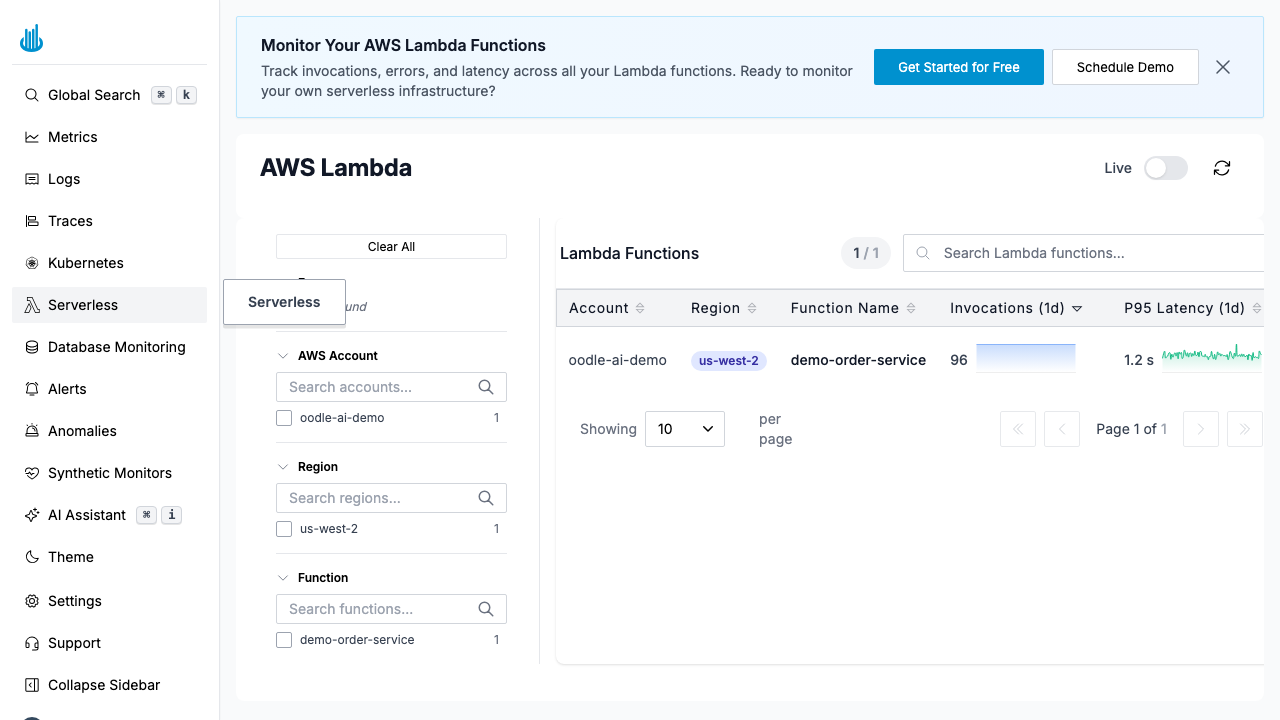
Navigate to Serverless in the sidebar. The page displays a table of all discovered Lambda functions across your connected AWS accounts.
Lambda Functions Table
| Column | Description |
|---|---|
| Account | AWS account name. |
| Region | AWS region, shown as a color-coded badge. |
| Function Name | Lambda function name. |
| Invocations (1d) | Total invocations over the last 24 hours, with a sparkline trend. |
| Errors (1d) | Total errors over the last 24 hours, with a sparkline trend. Values above zero are highlighted in red. |
| P95 Latency (1d) | 95th-percentile execution duration over the last 24 hours, with a sparkline trend. |
Filters
The left-hand filter panel lets you narrow the view:
- Errors: Show only functions that have errors.
- AWS Account: Filter by one or more AWS accounts.
- Region: Filter by one or more AWS regions.
- Function: Filter by specific function names.
Features
- Search: Full-text search across function names, accounts, and regions.
- Sorting: Click any column header to sort ascending or descending.
- Sparklines: Inline trend charts in the Invocations, Errors, and Latency columns show 24-hour trends at a glance.
- Click a row to open a detail drawer with two tabs:
- Metrics: A Grafana dashboard showing invocation timeline, duration distribution, error count, cold start ratio, and more.
- Logs: Recent log events for the selected function, filterable by index pattern.
Use Cases
- Monitor invocation volume: Spot sudden spikes or drops in function usage.
- Track latency: Identify functions with high P95 latency that may need optimization.
- Debug errors: Drill into functions with elevated error rates.
- Cold start analysis: Detect functions with frequent cold starts that impact user experience.
Best Practices
- Connect all accounts: Add all your AWS accounts to get full cross-account visibility.
- Review latency trends: Use the sparkline to spot gradual performance degradation before it becomes critical.
- Set alerts: Create alerts on Lambda metrics (invocation errors, duration) to get notified proactively.
Related Pages
- Kubernetes: Monitor Kubernetes clusters, workloads, and pods.
- Database Monitoring: Monitor database query performance and host health.
Support
If you need assistance or have any questions, please reach out to us through:
- Email at [email protected]