Hosts
The Hosts tab displays node-level details for your Kubernetes clusters. Each row represents a single node (host) and shows its resource utilization and status.
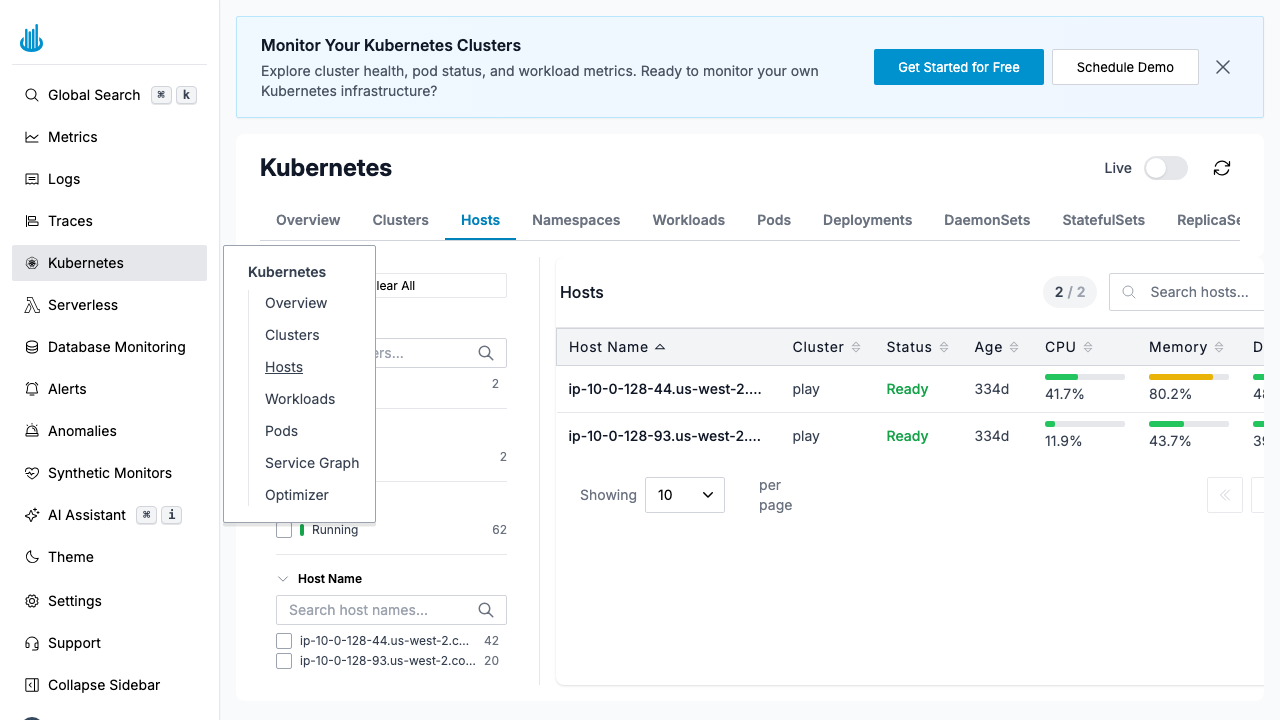
Hosts Table
| Column | Description |
|---|---|
| Host | Node name |
| Cluster | Which cluster the node belongs to |
| CPU | CPU utilization with a visual bar |
| Memory | Memory utilization with a visual bar |
| Pods | Number of pods running on this node |
| Status | Node condition (Ready, NotReady, etc.) |
Features
- Search — Filter nodes by hostname.
- Sorting — Click column headers to sort by any metric.
- Filters — Use the left-hand panel to filter by cluster.
- Click a row to see detailed metrics charts for CPU, memory, disk, and network over time.
Use Cases
- Identify nodes with high CPU or memory pressure.
- Find nodes approaching pod capacity limits.
- Detect NotReady nodes that may need attention.
Support
If you need assistance or have any questions, please reach out to us through:
- Email at [email protected]