HTTP
Send logs to Oodle using HTTP POST requests: from any application or system that can make HTTP requests.
Configuration
To send logs to Oodle via HTTP, you'll need the following values:
OODLE_INSTANCE: Your Oodle instance ID. Go toSettingsicon ->API Keyspage in your Oodle UI to find out. (Oodle UI links: ap1, us1)OODLE_API_KEY: Your Oodle API key for authentication. Go toSettingsicon ->API Keysin your Oodle UI to choose an appropriate key. (Oodle UI links: ap1, us1)
Steps
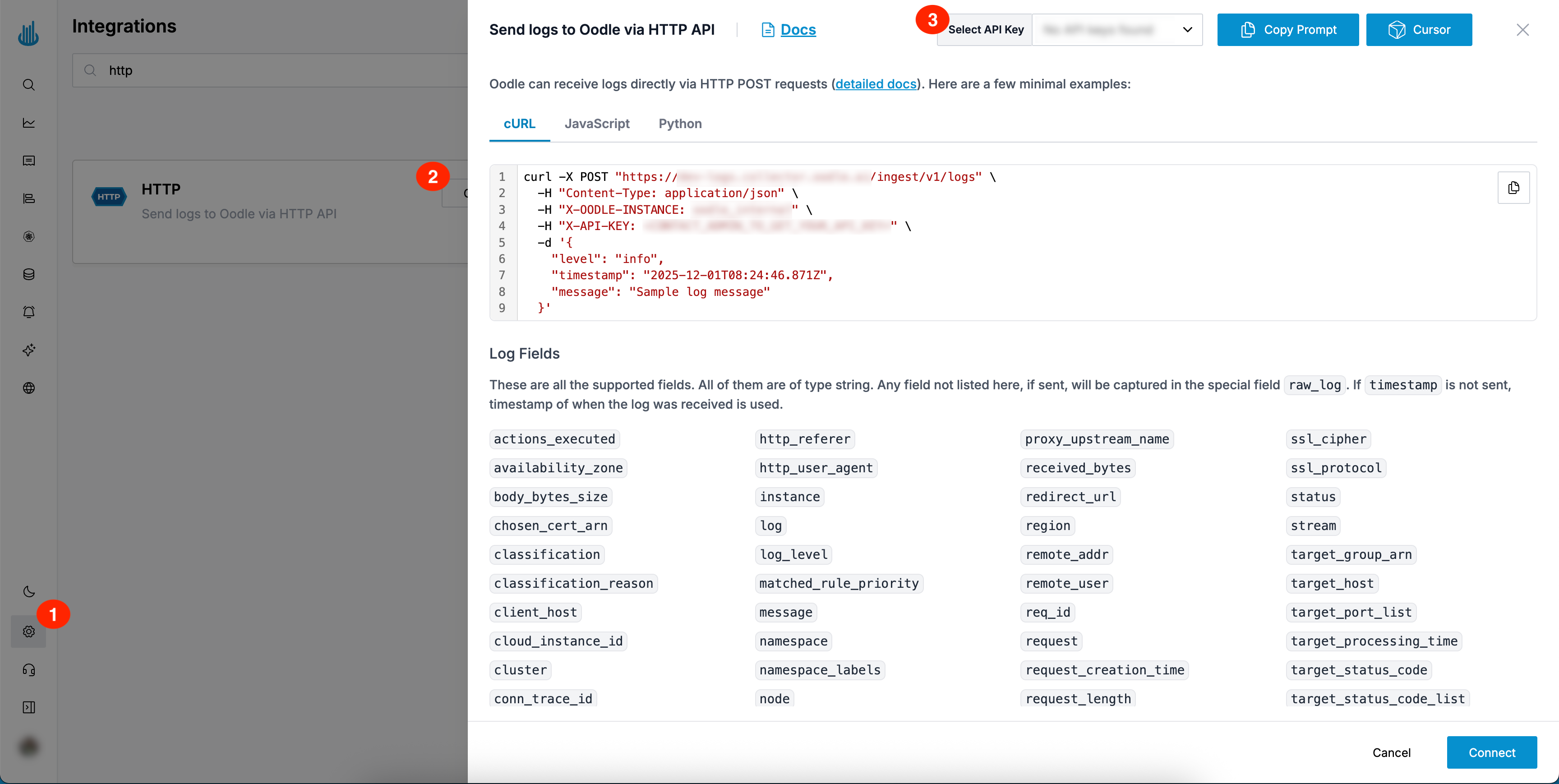
You can find the required HTTP configuration values by doing the following:
- Login to the Oodle UI, then navigate to the Integrations page
- Click on the HTTP tile
- Choose an appropriate API key from the list on top of the drawer
Execute the HTTP request via the possibilities listed in the tile (cURL, JavaScript, Python) to send logs to Oodle via HTTP POST requests.
Sending Logs
Oodle can receive logs directly via HTTP POST requests. Here are a few minimal examples:
- cURL
- JavaScript
- Python
curl -X POST "https://<OODLE_INSTANCE>-logs.collector.oodle.ai/ingest/v1/logs" \
  -H "Content-Type: application/json" \
  -H "X-OODLE-INSTANCE: <OODLE_INSTANCE>" \
  -H "X-API-KEY: <OODLE_API_KEY>" \
  -d '[{
    "level": "info",
    "timestamp": "2025-09-30T21:07:31.412Z",
    "message": "Sample log message"
  }, {
    "level": "warn",
    "timestamp": "2025-09-30T21:07:32.412Z",
    "message": "Sample warning"
  }]'
await fetch("https://<OODLE_INSTANCE>-logs.collector.oodle.ai/ingest/v1/logs", {
  method: "POST",
  headers: {
    "Content-Type": "application/json",
    "X-OODLE-INSTANCE": "<OODLE_INSTANCE>",
    "X-API-KEY": "<OODLE_API_KEY>"
  },
  body: JSON.stringify([{
    level: "info",
    timestamp: "2025-09-30T21:07:31.412Z",
    message: "Sample log message"
  }, {
    level: "warn",
    timestamp: "2025-09-30T21:07:32.412Z",
    message: "Sample warning"
  }])
})
import requests
import json

requests.post(
    "https://<OODLE_INSTANCE>-logs.collector.oodle.ai/ingest/v1/logs",
    headers={
        "Content-Type": "application/json",
        "X-OODLE-INSTANCE": "<OODLE_INSTANCE>",
        "X-API-KEY": "<OODLE_API_KEY>"
    },
    json=[{
        "level": "info",
        "timestamp": "2025-09-30T21:07:31.412Z",
        "message": "Sample log message"
    }, {
        "level": "warn",
        "timestamp": "2025-09-30T21:07:32.412Z",
        "message": "Sample warning"
    }]
)
Log Format
Logs should be sent as JSON objects, with a "message" key.
{
  "message": "Your log message here",
  "<OPTIONAL_ADDITIONAL_FIELD>": "<VALUE>"
}
Required Fields
message: The log message content
Supported Fields
The following table shows all fields Oodle supports. All of them are of type
string. Any field not listed here, if sent, will be captured in the raw_log
field, visible in Oodle Logs UI.
| Field Name | Description |
|---|---|
message | Required. The log message content |
timestamp | Log timestamp |
level | Log level (debug, info, warn, error, etc.) |
environment | Environment name (prod, staging, dev, etc.) |
service | Name of the service generating the log |
cluster | Cluster identifier |
platform | Platform identifier |
namespace | Kubernetes namespace |
log_group | Log group identifier |
log_stream | Log stream identifier |
cloud_instance_id | Cloud instance identifier |
node | Node identifier |
container_id | Container ID |
container_image | Container image name |
container_name | Container name |
namespace_labels | Kubernetes namespace labels (JSON string) |
node_labels | Node labels (JSON string) |
pod_labels | Pod labels (JSON string) |
pod_annotations | Pod annotations (JSON string) |
pod_ip | Pod IP address |
pod_ips | Pod IP addresses |
pod_name | Pod name |
lambda_arn | AWS Lambda ARN |
function_name | Function name |
task_definition | ECS task definition |
task_id | Task identifier |
trace_id | Distributed tracing trace ID |
span_id | Distributed tracing span ID |
launch_type | Launch type (e.g., EC2, FARGATE) |
source_type | Source type identifier |
Timestamp and Time Formats
If the request doesn't contain timestamp, the timestamp of when the request
was received is used.
The following formats are supported:
- RFC 3339:
2006-01-02T15:04:05Z07:00 - ISO 8601:
20060102T15:04:05.999999Z07:00 - Epoch seconds
- Epoch milliseconds
- Epoch microseconds
Support
If you need assistance or have any questions, please reach out to us through:
- Email at [email protected]