KEDA Prometheus Scaler
Overview
Kubernetes Event-Driven Autoscaling (KEDA) can scale workloads based on events from various sources, called "Scalers". It has a Prometheus Scaler, that can query metrics from Oodle.
This guide shows you Oodle-specific configurations for KEDA's Prometheus Scaler.
Prerequisites
To connect KEDA to Oodle via Oodle's Prometheus API, you will need the following:
OODLE_INSTANCE: Your Oodle instance ID. Go toSettingsicon ->API Keyspage in your Oodle UI to find out. (Oodle UI links: ap1, us1)OODLE_API_KEY: Your Oodle API key for authentication. Go toSettingsicon ->API Keysin your Oodle UI to choose an appropriate key. (Oodle UI links: ap1, us1)
Configuring KEDA to Query Oodle
Set serverAddress and customHeaders for each prometheus trigger of the
ScaledObject:
apiVersion: keda.sh/v1alpha1
kind: ScaledObject
metadata: ...
spec:
  ...
  triggers:
  - type: prometheus
    metadata:
      serverAddress: https://<OODLE_INSTANCE>.api.oodle.ai
      customHeaders: "X-API-KEY=<OODLE_API_KEY>,OODLE-INSTANCE=<OODLE_INSTANCE>"
      query: |
        sum(
          rate(
            http_requests_total{
              namespace="default"
            }[2m]
          )
        ) / sum(
          http_server_count{
            namespace="default"
          }
        )
      threshold: "10"
      activationThreshold: "1"
Steps
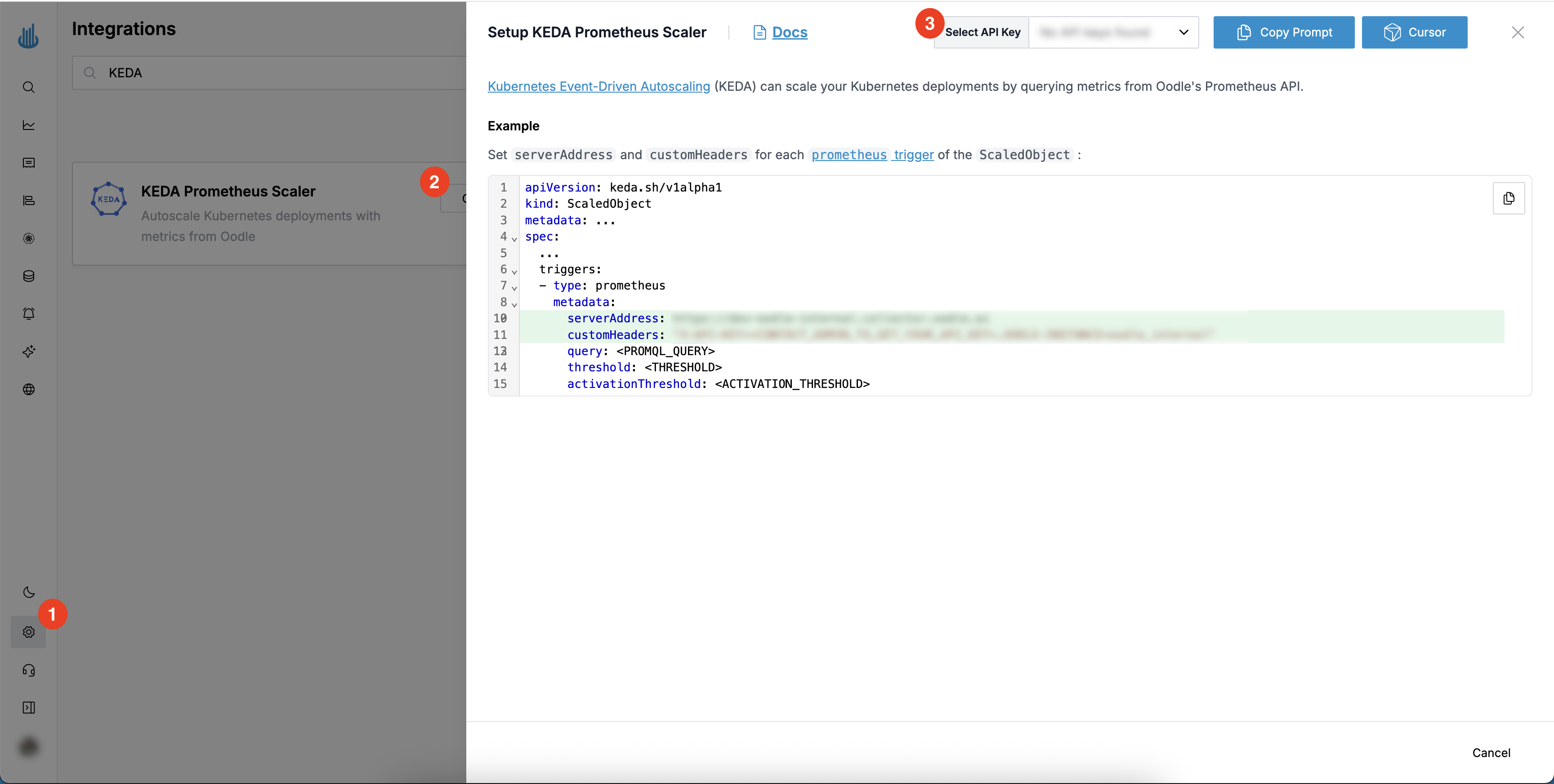
You can configure KEDA to query Oodle by following these steps:
- Login to the Oodle UI, then navigate to the Integrations page
- Click on the Prometheus tile
- Choose an appropriate API key from the list on top of the drawer
Follow the steps in the drawer to setup the KEDA configuration to query Oodle
Support
If you need assistance or have any questions, please reach out to us through:
- Email at [email protected]