Grafana Alloy
Oodle has native support for Open Telemetry Logs.
To send logs to Oodle from Grafana Alloy, you will need the following:
OODLE_INSTANCE: Your Oodle instance ID. Go toSettingsicon ->API Keyspage in your Oodle UI to find out. (Oodle UI links: ap1, us1)OODLE_API_KEY: Your Oodle API key for authentication. Go toSettingsicon ->API Keysin your Oodle UI to choose an appropriate key. (Oodle UI links: ap1, us1)
Alloy Configuration
You can add a otelcol.exporter.otlphttp component
to your Alloy configuration to send logs to Oodle:
otelcol.exporter.otlphttp "oodle_logs" {
  client {
    endpoint = "https://<OODLE_INSTANCE>-logs.collector.oodle.ai"
    headers = {
      "X-OODLE-INSTANCE" = "<OODLE_INSTANCE>",
      "X-API-KEY" = "<OODLE_API_KEY>",
    }
    compression = "gzip"
  }

  logs_endpoint =
    "https://<OODLE_INSTANCE>-logs.collector.oodle.ai/ingest/otel/v1/logs"
}

// Example of existing logs processor
otelcol.processor.attributes "add_environment" {
  action {
    // Existing config
  }

  output {
    logs = [
      otelcol.exporter.loki.default.input,
      otelcol.exporter.otlphttp.oodle_logs.input,
    ]
  }
}
Steps
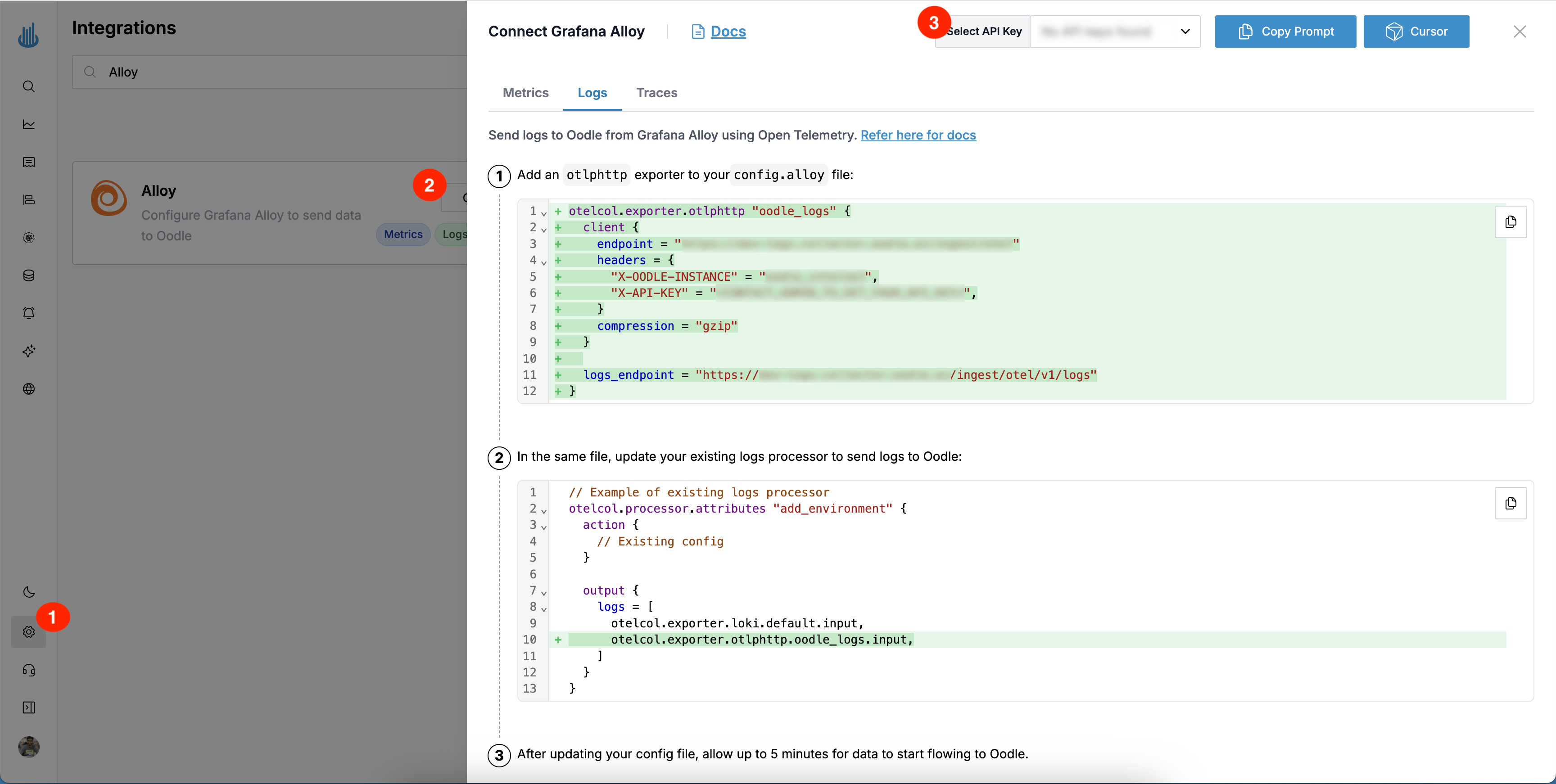
You can find the Alloy config changes by following these steps:
- Login to the Oodle UI, then navigate to the Integrations page
- Click on the Alloy tile
- Choose an appropriate API key from the list on top of the drawer
- Select the Logs tab
Follow the steps in the drawer to add a otelcol.exporter.otlphttp component
to your Alloy configuration to send logs to Oodle
Support
If you need assistance or have any questions, please reach out to us through:
- Email at [email protected]