Workloads
The Workloads tab lists all Kubernetes workloads across your clusters — Deployments, DaemonSets, StatefulSets, ReplicaSets, Jobs, and CronJobs — with their current status and resource consumption.
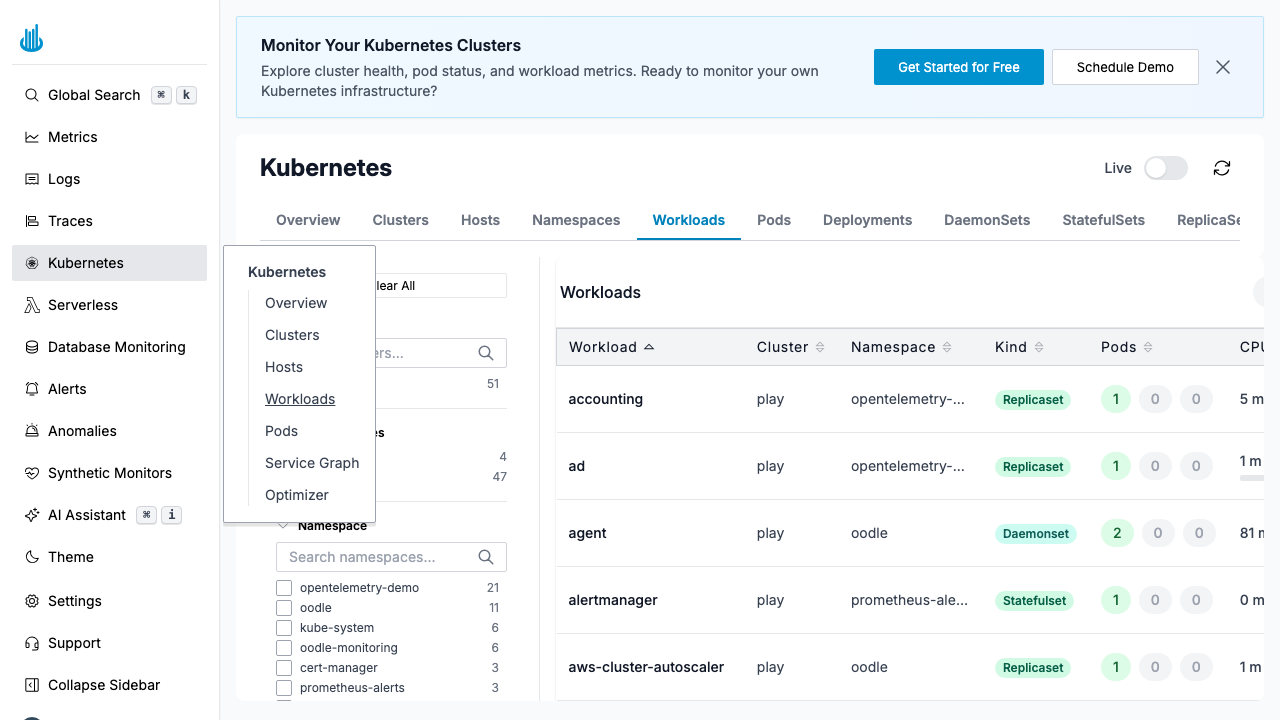
Workloads Table
| Column | Description |
|---|---|
| Workload | Workload name |
| Cluster | Cluster the workload runs in |
| Namespace | Kubernetes namespace |
| Kind | Resource kind (Deployment, DaemonSet, etc.) |
| Pods | Number of ready / desired pods |
| CPU | CPU usage |
| Memory | Memory usage |
Filters
Use the left-hand filter panel to narrow the view:
- Cluster — Select specific clusters.
- Namespace — Filter by namespace.
- Kind — Show only specific workload types (e.g. Deployments only).
- Search — Type to find a workload by name.
Features
- Sorting — Click column headers to sort.
- Click a row to see detailed resource graphs, pod list, and events for that workload.
- Anomaly indicators — Workloads with detected anomalies are highlighted.
Support
If you need assistance or have any questions, please reach out to us through:
- Email at [email protected]