Database Samples
The Samples tab displays individual query execution events captured from your databases. Unlike the aggregated Queries view, Samples shows each execution with its exact timestamp, full SQL statement, and the database instance it ran on.
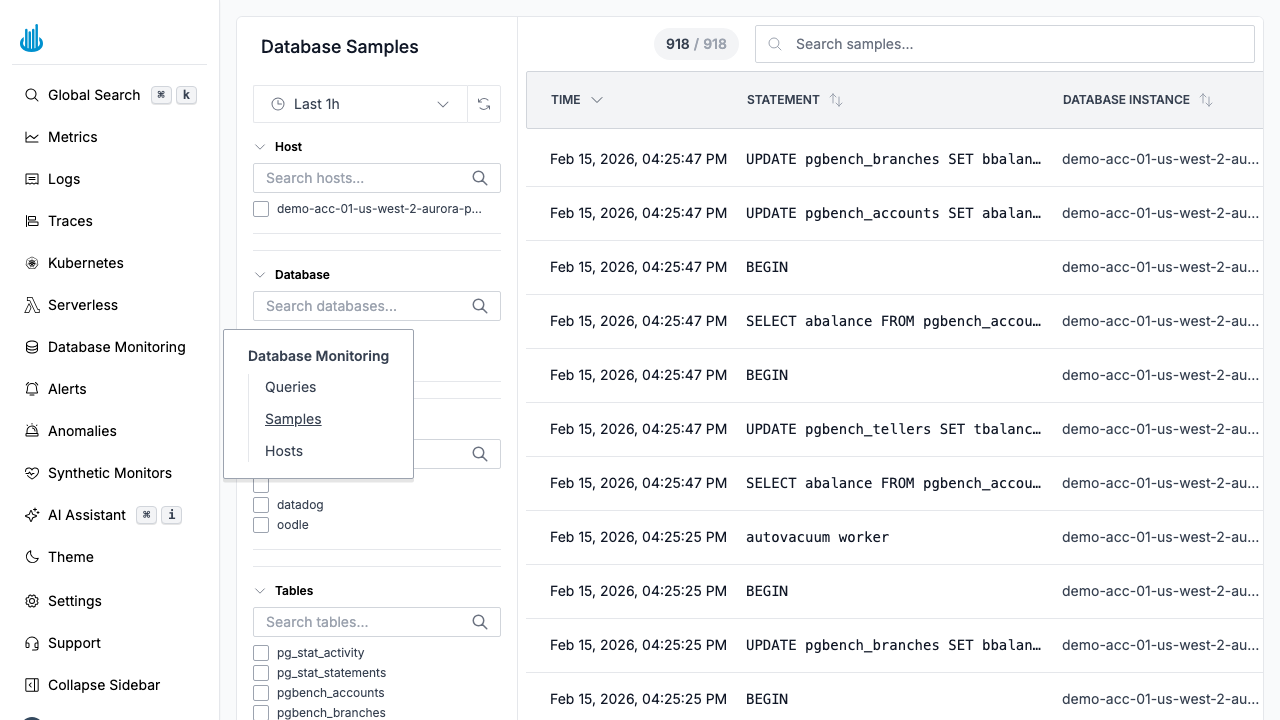
Samples Table
| Column | Description |
|---|---|
| Time | Exact timestamp of the execution. |
| Statement | Normalized SQL statement (displayed in monospace font). |
| Database Instance | The host the query ran on. |
| User | The database user that executed the query. |
| Wait Event Group | The wait-event category — color-coded badges for CPU, IO, Network, and Lock. |
| Database | The database name. |
| Duration | Execution duration, color-coded by severity. |
| Application | The client application name (if reported). |
| State | Current state of the query (e.g., active, idle). |
tip
The table shows the latest 1,000 samples. If the limit is reached, a note appears above the table. Narrow the time range to load more samples.
Filters
The left-hand panel provides:
- Host — Filter by database host.
- Database — Filter by database name.
- User — Filter by the database user.
- Tables — Filter by referenced table names.
- Commands — Filter by SQL command type (e.g., SELECT, INSERT).
Search
Use the search bar to filter samples by SQL text, host, database, or user.
Click to Drill Down
Click any sample row to open a detail drawer showing the full query text, execution plan (when available), and contextual details like client application name and user.
Use Cases
- Debug slow queries — Find specific executions that were abnormally slow and inspect their details.
- Audit activity — Review which queries ran at a specific time against a specific database.
- Investigate deadlocks — Examine the exact statements involved in a deadlock event.
- Validate deployments — After a schema migration, verify that new query patterns appear as expected.
Related Pages
- Database Queries — Aggregated query performance metrics.
- Database Hosts — Monitor host-level performance.
Support
If you need assistance or have any questions, please reach out to us through:
- Email at [email protected]