Pods
The Pods tab gives you a detailed, per-pod view of every pod running across your Kubernetes clusters. Use it to find failing, pending, or resource-hungry pods.
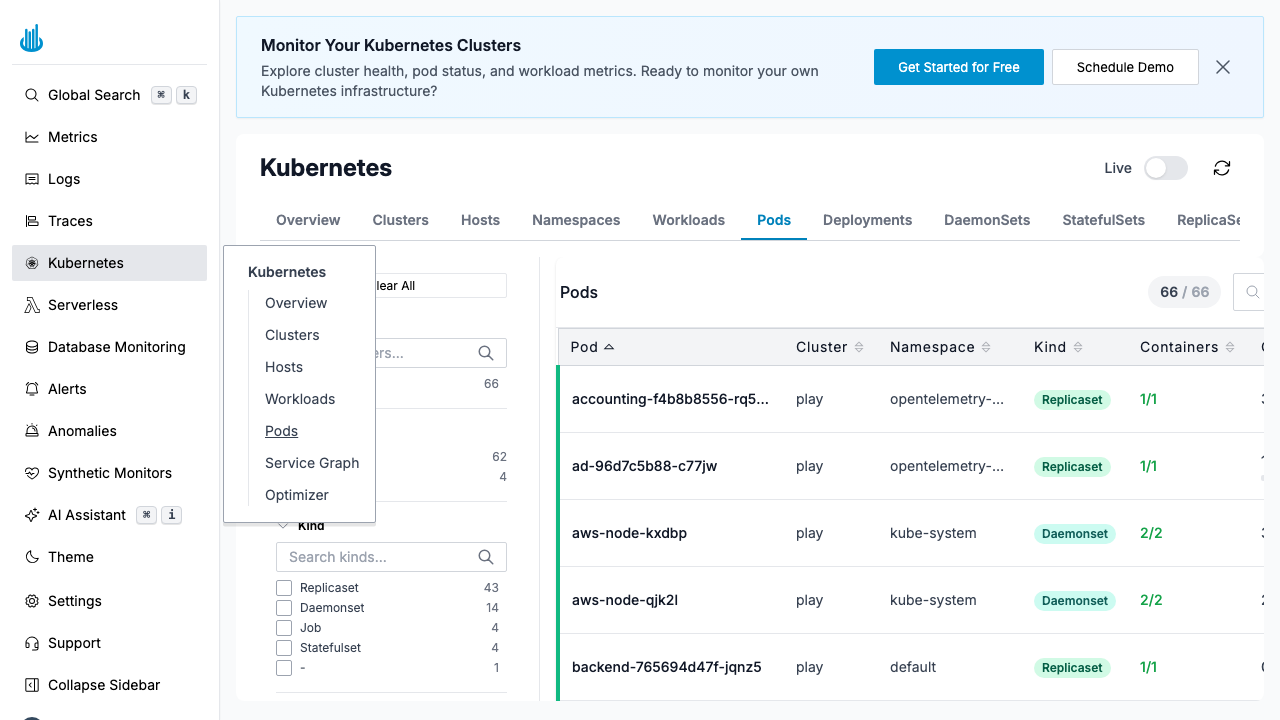
Pods Table
| Column | Description |
|---|---|
| Pod | Pod name |
| Cluster | Cluster the pod runs in |
| Namespace | Kubernetes namespace |
| Kind | Owning resource kind (ReplicaSet, DaemonSet, etc.) |
| Containers | Ready / total container count |
| Status | Pod phase (Running, Pending, Succeeded, Failed) |
| CPU | CPU usage |
| Memory | Memory usage |
| Restarts | Container restart count |
Filters
The left-hand filter panel offers fine-grained filtering:
- Cluster — Select one or more clusters.
- Kind — Filter by owning resource type (ReplicaSet, DaemonSet, StatefulSet, Job, etc.).
- Namespace — Filter by namespace.
- Container — Filter by container name.
- Pod name — Search by pod name.
- Host — Filter by the node the pod runs on.
Features
- Sorting — Click column headers to sort by any column.
- Search — Full-text search across pod names.
- Pagination — Navigate through large pod lists.
- Click a row to see detailed resource charts, container status, logs, and events for that pod.
Use Cases
- Find pods stuck in Pending or CrashLoopBackOff state.
- Identify pods with excessive restarts.
- Spot pods consuming unexpectedly high CPU or memory.
- Verify that new deployments rolled out successfully.
Support
If you need assistance or have any questions, please reach out to us through:
- Email at [email protected]