Query Traces
Query traces from Oodle using the HTTP API. This API supports querying traces by various filters including service, operation, duration, and custom labels with complex matchers (equals, not equals, regex, one-of).
Configuration
To query traces from Oodle via HTTP, you'll need the following values:
OODLE_INSTANCE: Your Oodle instance ID. Go toSettingsicon ->API Keyspage in your Oodle UI to find out. (Oodle UI links: ap1, us1)OODLE_API_KEY: Your Oodle API key for authentication. Go toSettingsicon ->API Keysin your Oodle UI to choose an appropriate key. (Oodle UI links: ap1, us1)
Steps
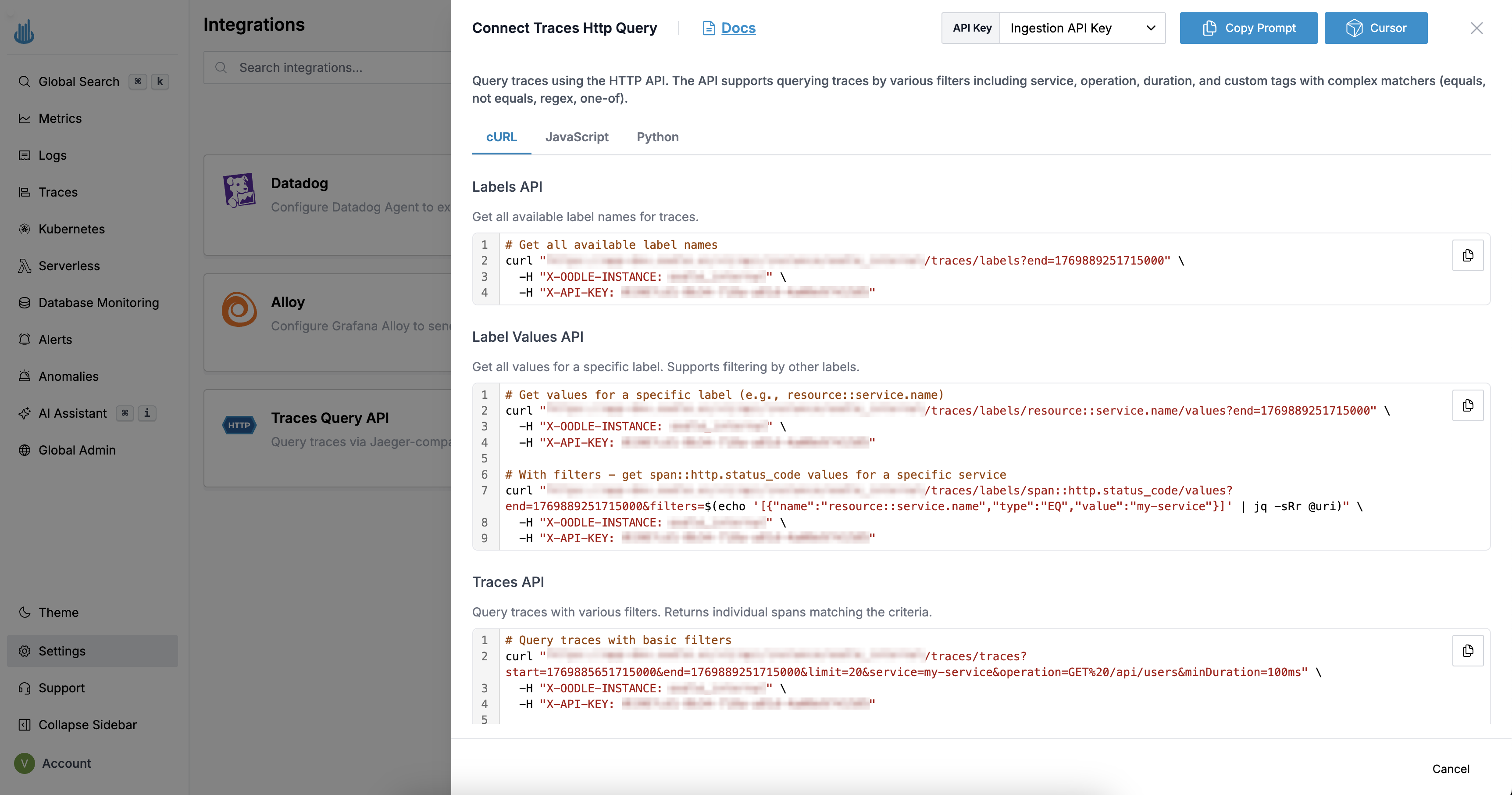
You can find the required Query Traces configuration values by doing the following:
- Login to the Oodle UI, then navigate to the Integrations page
- Click on the Traces Query API tile
- Choose an appropriate API key from the list on top of the drawer
Follow the steps specified in the drawer to query Traces from Oodle via HTTP requests.
API Endpoints
Labels API
Get all available label names for traces.
Endpoint: GET /v1/api/instance/<OODLE_INSTANCE>/traces/labels
- cURL
- JavaScript
- Python
# Get all available label names
curl "https://<OODLE_INSTANCE>.api.oodle.ai/v1/api/instance/<OODLE_INSTANCE>/traces/labels?end=1748000156000000" \
  -H "X-OODLE-INSTANCE: <OODLE_INSTANCE>" \
  -H "X-API-KEY: <OODLE_API_KEY>"
// Get all available label names
const params = new URLSearchParams({
  end: "1748000156000000"
});

const response = await fetch(
  `https://<OODLE_INSTANCE>.api.oodle.ai/v1/api/instance/<OODLE_INSTANCE>/traces/labels?${params}`,
  {
    headers: {
      "X-OODLE-INSTANCE": "<OODLE_INSTANCE>",
      "X-API-KEY": "<OODLE_API_KEY>"
    }
  }
);
const labels = await response.json();
import requests

# Get all available label names
response = requests.get(
    "https://<OODLE_INSTANCE>.api.oodle.ai/v1/api/instance/<OODLE_INSTANCE>/traces/labels",
    headers={
        "X-OODLE-INSTANCE": "<OODLE_INSTANCE>",
        "X-API-KEY": "<OODLE_API_KEY>"
    },
    params={"end": 1748000156000000}
)
labels = response.json()
Label Values API
Get all values for a specific label. Supports filtering by other labels.
Endpoint: GET /v1/api/instance/<OODLE_INSTANCE>/traces/labels/{label_name}/values
- cURL
- JavaScript
- Python
# Get values for a specific label (e.g., resource::service.name)
curl "https://<OODLE_INSTANCE>.api.oodle.ai/v1/api/instance/<OODLE_INSTANCE>/traces/labels/resource::service.name/values?end=1748000156000000" \
  -H "X-OODLE-INSTANCE: <OODLE_INSTANCE>" \
  -H "X-API-KEY: <OODLE_API_KEY>"

# With filters - get span::http.status_code values for a specific service
curl "https://<OODLE_INSTANCE>.api.oodle.ai/v1/api/instance/<OODLE_INSTANCE>/traces/labels/span::http.status_code/values?end=1748000156000000&filters=$(echo '[{"name":"resource::service.name","type":"EQ","value":"my-service"}]' | jq -sRr @uri)" \
  -H "X-OODLE-INSTANCE: <OODLE_INSTANCE>" \
  -H "X-API-KEY: <OODLE_API_KEY>"
// Get values for a specific label
const labelName = "resource::service.name";
const params = new URLSearchParams({
  end: "1748000156000000",
  // Optional: filter by other labels
  filters: JSON.stringify([
    { name: "resource::deployment.environment", type: "EQ", value: "production" }
  ])
});

const response = await fetch(
  `https://<OODLE_INSTANCE>.api.oodle.ai/v1/api/instance/<OODLE_INSTANCE>/traces/labels/${encodeURIComponent(labelName)}/values?${params}`,
  {
    headers: {
      "X-OODLE-INSTANCE": "<OODLE_INSTANCE>",
      "X-API-KEY": "<OODLE_API_KEY>"
    }
  }
);
const values = await response.json();
import requests
import json
from urllib.parse import quote

# Get values for a specific label
label_name = "resource::service.name"
response = requests.get(
    f"https://<OODLE_INSTANCE>.api.oodle.ai/v1/api/instance/<OODLE_INSTANCE>/traces/labels/{quote(label_name, safe='')}/values",
    headers={
        "X-OODLE-INSTANCE": "<OODLE_INSTANCE>",
        "X-API-KEY": "<OODLE_API_KEY>"
    },
    params={
        "end": 1748000156000000,
        # Optional: filter by other labels
        "filters": json.dumps([
            {"name": "resource::deployment.environment", "type": "EQ", "value": "production"}
        ])
    }
)
values = response.json()
Traces API
Query traces with various filters. Returns complete traces grouped by trace ID.
Endpoint: GET /v1/api/instance/<OODLE_INSTANCE>/traces/traces
- cURL
- JavaScript
- Python
# Query traces with basic filters
curl "https://<OODLE_INSTANCE>.api.oodle.ai/v1/api/instance/<OODLE_INSTANCE>/traces/traces?start=1747913756000000&end=1748000156000000&limit=20&service=my-service&operation=GET%20/api/users&minDuration=100ms" \
  -H "X-OODLE-INSTANCE: <OODLE_INSTANCE>" \
  -H "X-API-KEY: <OODLE_API_KEY>"

# Query traces with filters (supports EQ, NEQ, RE, NRE, ONE_OF)
curl "https://<OODLE_INSTANCE>.api.oodle.ai/v1/api/instance/<OODLE_INSTANCE>/traces/traces?start=1747913756000000&end=1748000156000000&limit=20&filters=$(echo '[{"name":"resource::service.name","type":"EQ","value":"my-service"},{"name":"span::http.status_code","type":"RE","value":"5.."}]' | jq -sRr @uri)" \
  -H "X-OODLE-INSTANCE: <OODLE_INSTANCE>" \
  -H "X-API-KEY: <OODLE_API_KEY>"
// Query traces with filters
const params = new URLSearchParams({
  start: "1747913756000000",
  end: "1748000156000000",
  limit: "20",
  service: "my-service",
  minDuration: "100ms",
  // Filters array - all filters are ANDed together
  filters: JSON.stringify([
    { name: "resource::service.name", type: "EQ", value: "my-service" },
    { name: "span::http.status_code", type: "RE", value: "5.." },  // Regex match 5xx
    { name: "resource::deployment.environment", type: "ONE_OF", multiValue: ["prod", "staging"] }
  ])
});

const response = await fetch(
  `https://<OODLE_INSTANCE>.api.oodle.ai/v1/api/instance/<OODLE_INSTANCE>/traces/traces?${params}`,
  {
    headers: {
      "X-OODLE-INSTANCE": "<OODLE_INSTANCE>",
      "X-API-KEY": "<OODLE_API_KEY>"
    }
  }
);
const data = await response.json();
import requests
import json

# Query traces with filters
response = requests.get(
    "https://<OODLE_INSTANCE>.api.oodle.ai/v1/api/instance/<OODLE_INSTANCE>/traces/traces",
    headers={
        "X-OODLE-INSTANCE": "<OODLE_INSTANCE>",
        "X-API-KEY": "<OODLE_API_KEY>"
    },
    params={
        "start": 1747913756000000,
        "end": 1748000156000000,
        "limit": 20,
        "service": "my-service",
        "minDuration": "100ms",
        # Filters array - all filters are ANDed together
        "filters": json.dumps([
            {"name": "resource::service.name", "type": "EQ", "value": "my-service"},
            {"name": "span::http.status_code", "type": "RE", "value": "5.."},
            {"name": "resource::deployment.environment", "type": "ONE_OF", "multiValue": ["prod", "staging"]}
        ])
    }
)
data = response.json()
Trace by ID API
Get a specific trace by its ID.
Endpoint: GET /v1/api/instance/<OODLE_INSTANCE>/traces/traces/{trace_id}
- cURL
- JavaScript
- Python
# Get a specific trace by ID
curl "https://<OODLE_INSTANCE>.api.oodle.ai/v1/api/instance/<OODLE_INSTANCE>/traces/traces/<TRACE_ID>?start=1747913756000000&end=1748000156000000" \
  -H "X-OODLE-INSTANCE: <OODLE_INSTANCE>" \
  -H "X-API-KEY: <OODLE_API_KEY>"
// Get a specific trace by ID
const traceId = "<TRACE_ID>";
const params = new URLSearchParams({
  start: "1747913756000000",
  end: "1748000156000000"
});

const response = await fetch(
  `https://<OODLE_INSTANCE>.api.oodle.ai/v1/api/instance/<OODLE_INSTANCE>/traces/traces/${encodeURIComponent(traceId)}?${params}`,
  {
    headers: {
      "X-OODLE-INSTANCE": "<OODLE_INSTANCE>",
      "X-API-KEY": "<OODLE_API_KEY>"
    }
  }
);
const trace = await response.json();
import requests
from urllib.parse import quote

# Get a specific trace by ID
trace_id = "<TRACE_ID>"
response = requests.get(
    f"https://<OODLE_INSTANCE>.api.oodle.ai/v1/api/instance/<OODLE_INSTANCE>/traces/traces/{quote(trace_id, safe='')}",
    headers={
        "X-OODLE-INSTANCE": "<OODLE_INSTANCE>",
        "X-API-KEY": "<OODLE_API_KEY>"
    },
    params={
        "start": 1747913756000000,
        "end": 1748000156000000
    }
)
trace = response.json()
Query Parameters Reference
| Parameter | Type | Required | Description |
|---|---|---|---|
start | integer | Yes (for traces) | Start timestamp in microseconds |
end | integer | Yes (for traces), Optional (for labels) | End timestamp in microseconds |
service | string | No | Filter by service name (exact match) |
operation | string | No | Filter by operation/span name (exact match) |
minDuration | string | No | Minimum span duration (e.g., 100ms, 1s, 500us) |
maxDuration | string | No | Maximum span duration |
limit | integer | No | Maximum number of results to return |
filters | JSON | No | JSON array of matchers (see Filter Types below) |
Time Formats
Timestamps must be provided in microseconds (Unix epoch):
- 1 second = 1,000,000 microseconds
- Example: January 1, 2025 00:00:00 UTC =
1735689600000000
Duration Formats
Duration parameters accept human-readable formats:
100ms- 100 milliseconds1s- 1 second500us- 500 microseconds
Filter Types
The filters parameter accepts a JSON array of matcher objects with the following structure:
[{ "name": "label_name", "type": "EQ", "value": "value" }]
| Type | Description |
|---|---|
EQ | Equals: exact match |
NEQ | Not equals: exclude matching values |
RE | Regex: match using regular expression (e.g., "5.." for 5xx status codes) |
NRE | Not regex: exclude values matching the regex |
ONE_OF | One of: match any value in the list (use multiValue instead of value) |
Filter types are case-insensitive. "eq", "EQ", and "Eq" are all valid.
Combining Filters (AND/OR Logic)
All filters in the array are combined with AND logic at the top level. Nested AND/OR combinations are not supported.
AND: Multiple filters in the array
[
  {"name": "resource::service.name", "type": "EQ", "value": "api"},
  {"name": "span::http.status_code", "type": "RE", "value": "5.."}
]
→ resource::service.name = "api" AND span::http.status_code matches 5xx
OR within a single field: Use ONE_OF
[
  {"name": "resource::deployment.environment", "type": "ONE_OF", "multiValue": ["prod", "staging"]}
]
→ resource::deployment.environment = "prod" OR resource::deployment.environment = "staging"
OR within a single field: Use Regex (RE)
[
  {"name": "span::http.status_code", "type": "RE", "value": "4..|5.."}
]
→ span::http.status_code matches 4xx OR 5xx
Combined example: AND + OR
[
  {"name": "resource::service.name", "type": "EQ", "value": "api"},
  {"name": "resource::deployment.environment", "type": "ONE_OF", "multiValue": ["prod", "staging"]},
  {"name": "span::http.status_code", "type": "RE", "value": "5.."}
]
→ resource::service.name = "api" AND (resource::deployment.environment = "prod" OR resource::deployment.environment = "staging") AND span::http.status_code matches 5xx
Response Format
Traces Response
{
  "data": [
    {
      "traceID": "abc123def456",
      "spans": [
        {
          "traceID": "abc123def456",
          "spanID": "span123",
          "operationName": "GET /api/users",
          "serviceName": "api-server",
          "startTime": 1747913756000000,
          "duration": 150000,
          "tags": [
            {"key": "http.method", "value": "GET"},
            {"key": "http.status_code", "value": "200"}
          ],
          "logs": [],
          "references": []
        }
      ],
      "processes": {
        "p1": {
          "serviceName": "api-server",
          "tags": []
        }
      }
    }
  ],
  "total": 1,
  "limit": 20,
  "offset": 0,
  "errors": null
}
Labels Response
{
  "data": ["resource::service.name", "span::http.status_code", "resource::deployment.environment"],
  "total": 3,
  "errors": null
}
Available Endpoints
| Endpoint | Method | Description |
|---|---|---|
/traces/labels | GET | List available trace labels |
/traces/labels/{label}/values | GET | Get values for a label |
/traces/traces | GET | Search traces with filters |
/traces/traces/{traceId} | GET | Get a specific trace by ID |
Support
If you need assistance or have any questions, please reach out to us through:
- Email at [email protected]