Datadog
Oodle ingests metrics, logs, and traces (APM) from the Datadog agent. This guide covers all supported signals and configuration methods.
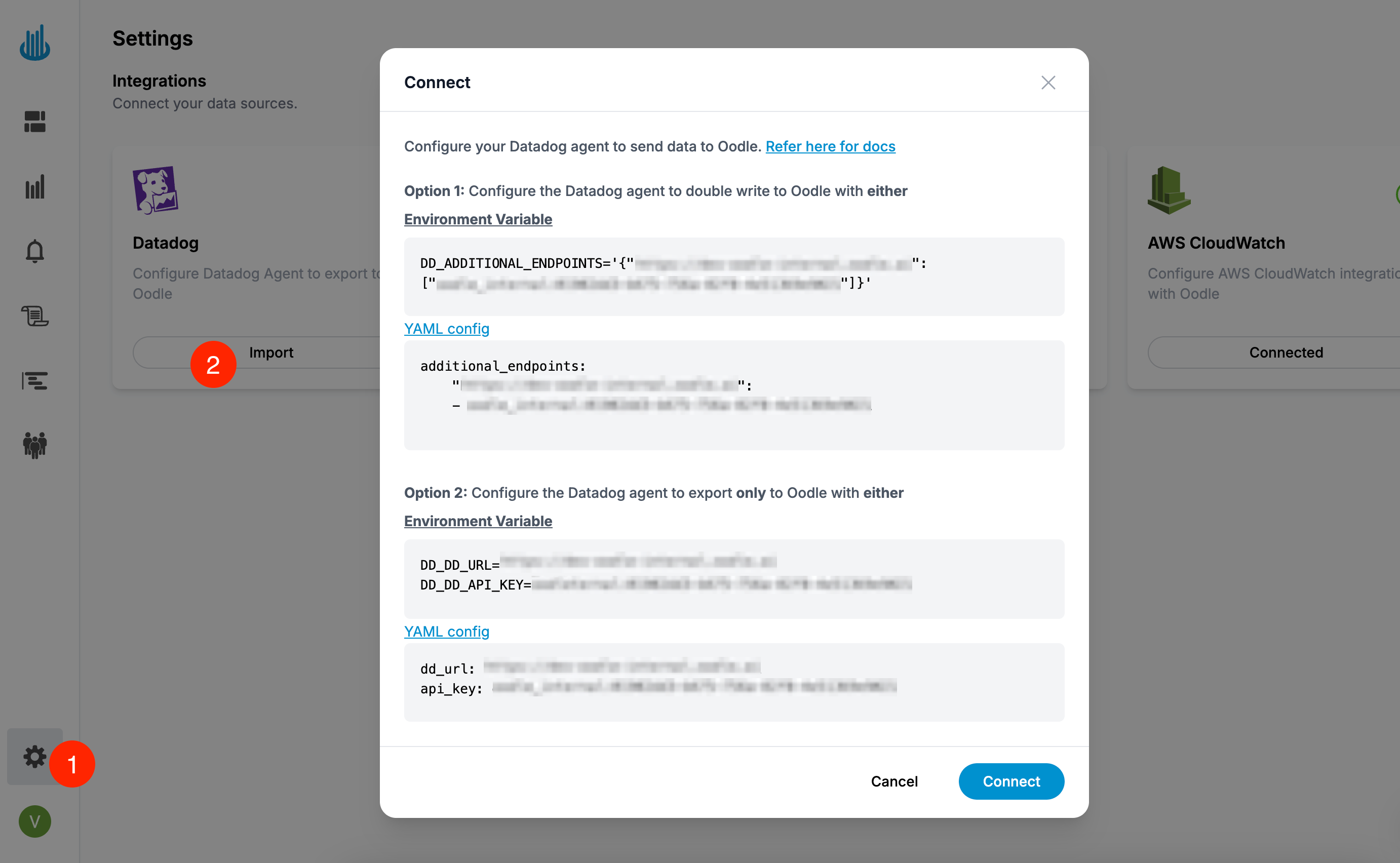
The quickest way to get started is through the Datadog integration tile on the Integrations page — it generates the exact configuration for your instance.
Supported signals
| Signal | Dual-ship env var | Single-ship env var |
|---|---|---|
| Metrics | DD_ADDITIONAL_ENDPOINTS | DD_DD_URL + DD_API_KEY |
| Logs | DD_LOGS_CONFIG_ADDITIONAL_ENDPOINTS | DD_LOGS_CONFIG_DD_URL |
| Traces | DD_APM_ADDITIONAL_ENDPOINTS | DD_APM_DD_URL |
The endpoint URL and API key for your instance are shown in the Datadog tile on the Settings → Integrations page.
Wherever metrics are shipped to Oodle, set
DD_USE_V3_API_SERIES_ENABLED=false (agent config key
use_v3_api.series.enabled: false) so the Agent submits
series on the v2 metrics intake that Oodle accepts. This
setting is included in every metrics configuration below.
Dual-shipping (Datadog + Oodle)
Send data to both Datadog and Oodle simultaneously.
Datadog Helm chart
Add the following to your Helm values.yaml for the
Datadog Helm chart:
datadog:
  env:
    # Metrics
    - name: DD_ADDITIONAL_ENDPOINTS
      value: '{"<oodle_metrics_endpoint>": ["<oodle_api_key>"]}'
    - name: DD_USE_V3_API_SERIES_ENABLED
      value: 'false'
    # Logs
    - name: DD_LOGS_CONFIG_ADDITIONAL_ENDPOINTS
      value: '[{"api_key": "<oodle_api_key>", "Host": "<oodle_logs_host>", "Port": 443, "is_reliable": false}]'
    - name: DD_LOGS_CONFIG_FORCE_USE_HTTP
      value: 'true'
    # APM / Traces
    - name: DD_APM_ADDITIONAL_ENDPOINTS
      value: '{"<oodle_traces_endpoint>": ["<oodle_api_key>"]}'

clusterAgent:
  env:
    # Metrics (cluster agent also needs this)
    - name: DD_ADDITIONAL_ENDPOINTS
      value: '{"<oodle_metrics_endpoint>": ["<oodle_api_key>"]}'
    - name: DD_USE_V3_API_SERIES_ENABLED
      value: 'false'
Then install or upgrade:
helm repo add --force-update datadog \
  https://helm.datadoghq.com && \
helm upgrade --install datadog-agent datadog/datadog \
  --values values.yaml
Datadog Operator
Apply the following DatadogAgent resource:
apiVersion: datadoghq.com/v2alpha1
kind: DatadogAgent
metadata:
  name: datadog

spec:
  override:
    nodeAgent:
      containers:
        agent:
          env:
            # Metrics
            - name: DD_ADDITIONAL_ENDPOINTS
              value: '{"<oodle_metrics_endpoint>": ["<oodle_api_key>"]}'
            - name: DD_USE_V3_API_SERIES_ENABLED
              value: 'false'
            # Logs
            - name: DD_LOGS_CONFIG_ADDITIONAL_ENDPOINTS
              value: '[{"api_key": "<oodle_api_key>", "Host": "<oodle_logs_host>", "Port": 443, "is_reliable": false}]'
            - name: DD_LOGS_CONFIG_FORCE_USE_HTTP
              value: 'true'
        trace-agent:
          env:
            # APM / Traces
            - name: DD_APM_ADDITIONAL_ENDPOINTS
              value: '{"<oodle_traces_endpoint>": ["<oodle_api_key>"]}'
    clusterAgent:
      env:
        # Metrics (cluster agent also needs this)
        - name: DD_ADDITIONAL_ENDPOINTS
          value: '{"<oodle_metrics_endpoint>": ["<oodle_api_key>"]}'
        - name: DD_USE_V3_API_SERIES_ENABLED
          value: 'false'
kubectl apply -f datadog-agent.yaml
Datadog Agent YAML
Add the following to your datadog.yaml:
# Metrics
additional_endpoints:
  "<oodle_metrics_endpoint>":
    - <oodle_api_key>
use_v3_api:
  series:
    enabled: false

# APM / Traces
apm_config:
  additional_endpoints:
    "<oodle_traces_endpoint>":
      - <oodle_api_key>

# Logs
logs_config:
  force_use_http: true
  additional_endpoints:
    - api_key: <oodle_api_key>
      Host: <oodle_logs_host>
      Port: 443
      is_reliable: false
Environment variables
If you are not using Helm, Operator, or YAML config,
set these environment variables on both the agent and
cluster-agent containers:
# Metrics
DD_ADDITIONAL_ENDPOINTS=\
'{"<oodle_metrics_endpoint>": ["<oodle_api_key>"]}'
DD_USE_V3_API_SERIES_ENABLED=false

# Logs
DD_LOGS_CONFIG_ADDITIONAL_ENDPOINTS=\
'[{"api_key": "<oodle_api_key>", "Host": "<oodle_logs_host>", "Port": 443, "is_reliable": false}]'
DD_LOGS_CONFIG_FORCE_USE_HTTP='true'

# APM / Traces
DD_APM_ADDITIONAL_ENDPOINTS=\
'{"<oodle_traces_endpoint>": ["<oodle_api_key>"]}'
Single-shipping (Oodle only)
Stop sending data to Datadog and send only to Oodle.
Datadog Helm chart
datadog:
  apiKey: <oodle_api_key>
  dd_url: <oodle_metrics_endpoint>
  logs:
    enabled: true
  apm:
    enabled: true
  env:
    # Metrics
    - name: DD_USE_V3_API_SERIES_ENABLED
      value: 'false'
    # Logs
    - name: DD_LOGS_CONFIG_DD_URL
      value: '<oodle_logs_base_url>'
    - name: DD_LOGS_CONFIG_FORCE_USE_HTTP
      value: 'true'
    # APM / Traces
    - name: DD_APM_DD_URL
      value: '<oodle_traces_endpoint>'
Then install or upgrade:
helm repo add --force-update datadog \
  https://helm.datadoghq.com && \
helm upgrade --install datadog-agent datadog/datadog \
  --values values.yaml
Datadog Operator
apiVersion: datadoghq.com/v2alpha1
kind: DatadogAgent
metadata:
  name: datadog

spec:
  global:
    endpoint:
      url: <oodle_metrics_endpoint>
    credentials:
      apiKey: <oodle_api_key>

  override:
    nodeAgent:
      containers:
        agent:
          env:
            # Metrics
            - name: DD_USE_V3_API_SERIES_ENABLED
              value: 'false'
            # Logs
            - name: DD_LOGS_CONFIG_DD_URL
              value: '<oodle_logs_base_url>'
            - name: DD_LOGS_CONFIG_FORCE_USE_HTTP
              value: 'true'
        trace-agent:
          env:
            # APM / Traces
            - name: DD_APM_DD_URL
              value: '<oodle_traces_endpoint>'
kubectl apply -f datadog-agent.yaml
Datadog Agent YAML
# Metrics
dd_url: <oodle_metrics_endpoint>
api_key: <oodle_api_key>
use_v3_api:
  series:
    enabled: false

# APM / Traces
apm_config:
  apm_dd_url: <oodle_traces_endpoint>

# Logs
logs_config:
  logs_dd_url: <oodle_logs_base_url>
  force_use_http: true
Environment variables
# Metrics
DD_DD_URL=<oodle_metrics_endpoint>
DD_API_KEY=<oodle_api_key>
DD_USE_V3_API_SERIES_ENABLED=false

# Logs
DD_LOGS_CONFIG_DD_URL='<oodle_logs_base_url>'
DD_LOGS_CONFIG_FORCE_USE_HTTP='true'

# APM / Traces
DD_APM_DD_URL='<oodle_traces_endpoint>'
Amazon ECS
Run the Datadog Agent in Amazon ECS
and ship its metrics, logs, and traces to Oodle by setting the
same environment variables on the Agent container: the
injected sidecar on Fargate, or the Agent daemon task on
EC2. Both launch types use the official
terraform-aws-ecs-datadog
module (ecs_fargate / ecs_ec2), which exposes a
dd_environment input for exactly these variables.
The fastest path is the ECS integration tile on the
Settings → Integrations page, which renders the exact
environment block for your instance. A runnable end-to-end
example for both launch types lives in the
oodle-onboarding datadog/ecs
demo. For the full ECS guide (including log-only routers such
as FireLens / OpenTelemetry / CloudWatch), see the
Amazon ECS guide.
Dual-write (Datadog + Oodle)
Add Oodle as additional endpoints on the Agent container. This is
additive, so keep your existing DD_API_KEY / DD_SITE.
"environment": [
  {
    "name": "DD_ADDITIONAL_ENDPOINTS",
    "value": "{\"<oodle_metrics_endpoint>\": [\"<oodle_api_key>\"]}"
  },
  { "name": "DD_USE_V3_API_SERIES_ENABLED", "value": "false" },
  {
    "name": "DD_LOGS_CONFIG_ADDITIONAL_ENDPOINTS",
    "value": "[{\"api_key\": \"<oodle_api_key>\", \"Host\": \"<oodle_logs_host>\", \"Port\": 443, \"is_reliable\": false}]"
  },
  { "name": "DD_LOGS_CONFIG_FORCE_USE_HTTP", "value": "true" },
  {
    "name": "DD_APM_ADDITIONAL_ENDPOINTS",
    "value": "{\"<oodle_traces_endpoint>\": [\"<oodle_api_key>\"]}"
  }
]
Single-write (Oodle only)
Override the Agent's primary endpoints and authenticate with your Oodle API key. No Datadog account is required.
"environment": [
  { "name": "DD_API_KEY", "value": "<oodle_api_key>" },
  { "name": "DD_DD_URL", "value": "<oodle_metrics_endpoint>" },
  { "name": "DD_USE_V3_API_SERIES_ENABLED", "value": "false" },
  { "name": "DD_APM_DD_URL", "value": "<oodle_traces_endpoint>" },
  { "name": "DD_LOGS_CONFIG_LOGS_DD_URL", "value": "<oodle_logs_host>:443" },
  { "name": "DD_LOGS_CONFIG_FORCE_USE_HTTP", "value": "true" }
]
On the EC2 launch type, also set
DD_ORCHESTRATOR_EXPLORER_ENABLED=false. Orchestrator Explorer
ships to Datadog's site-based process intake, which DD_DD_URL
cannot redirect to Oodle.
Support
If you need assistance or have any questions, please reach out to us through:
- Email at [email protected]